ManualDenzel EQ plugin →
Denzel EQ
Nothing here is modelled on a specific box - you design the behaviour yourself, and you are not held to what hardware could actually do. Underneath that it is still a complete EQ: everything a regular parametric EQ does, then a full dynamic EQ on every band (turns down when loud, up when quiet); its own distortion per band; auto clash-fixing (the brain finds where this track masks another and hands you the exact cut); phase-correlation correction in its own section - four dedicated all-pass slots that cost you no EQ band, over a live readout of how this track correlates with another; and spectrum-aware presets that fit the actual signal.
The rack face - magnitude view, every control mapped
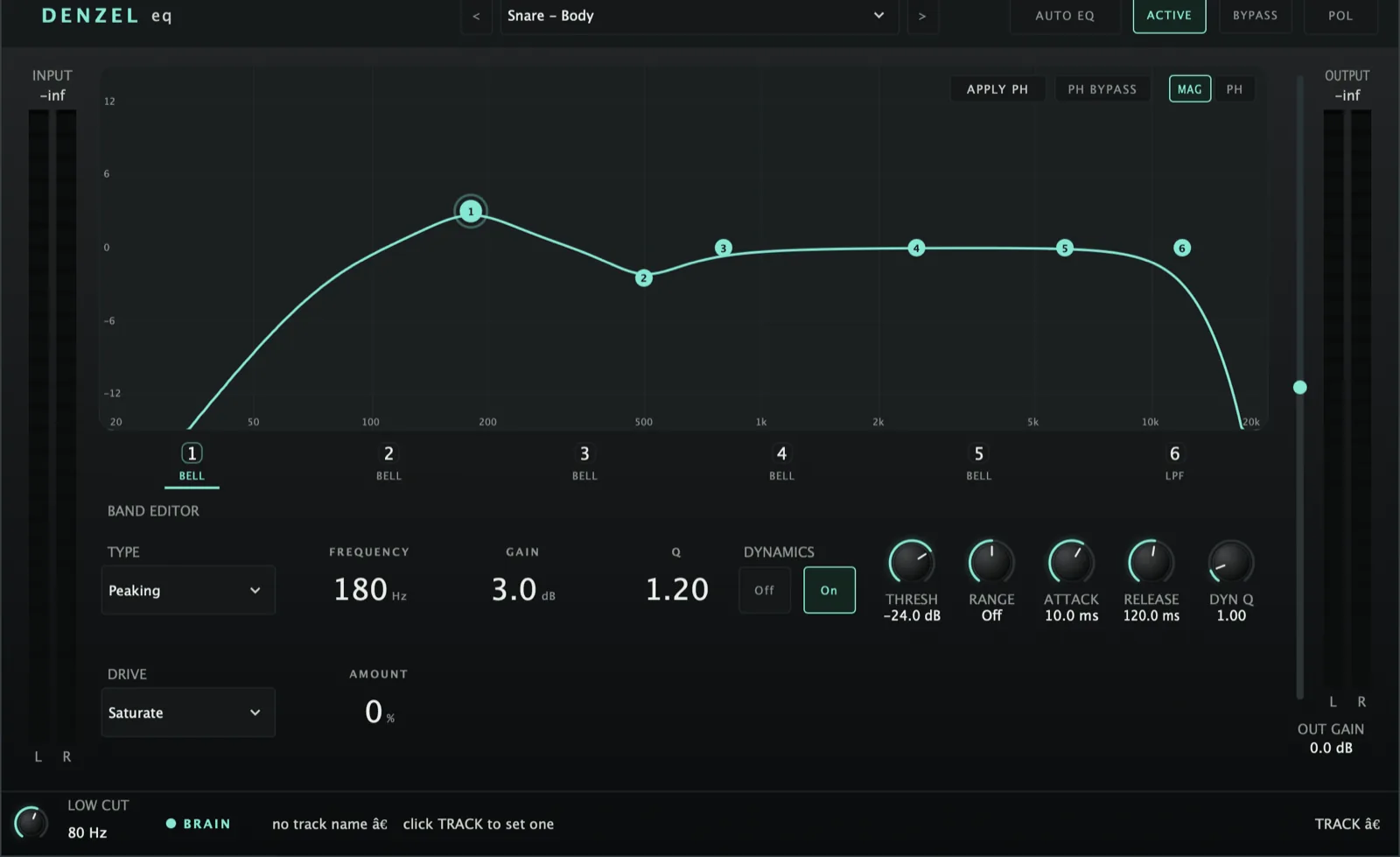 123456789101112
Phase view - a separate section, measured against a partner track
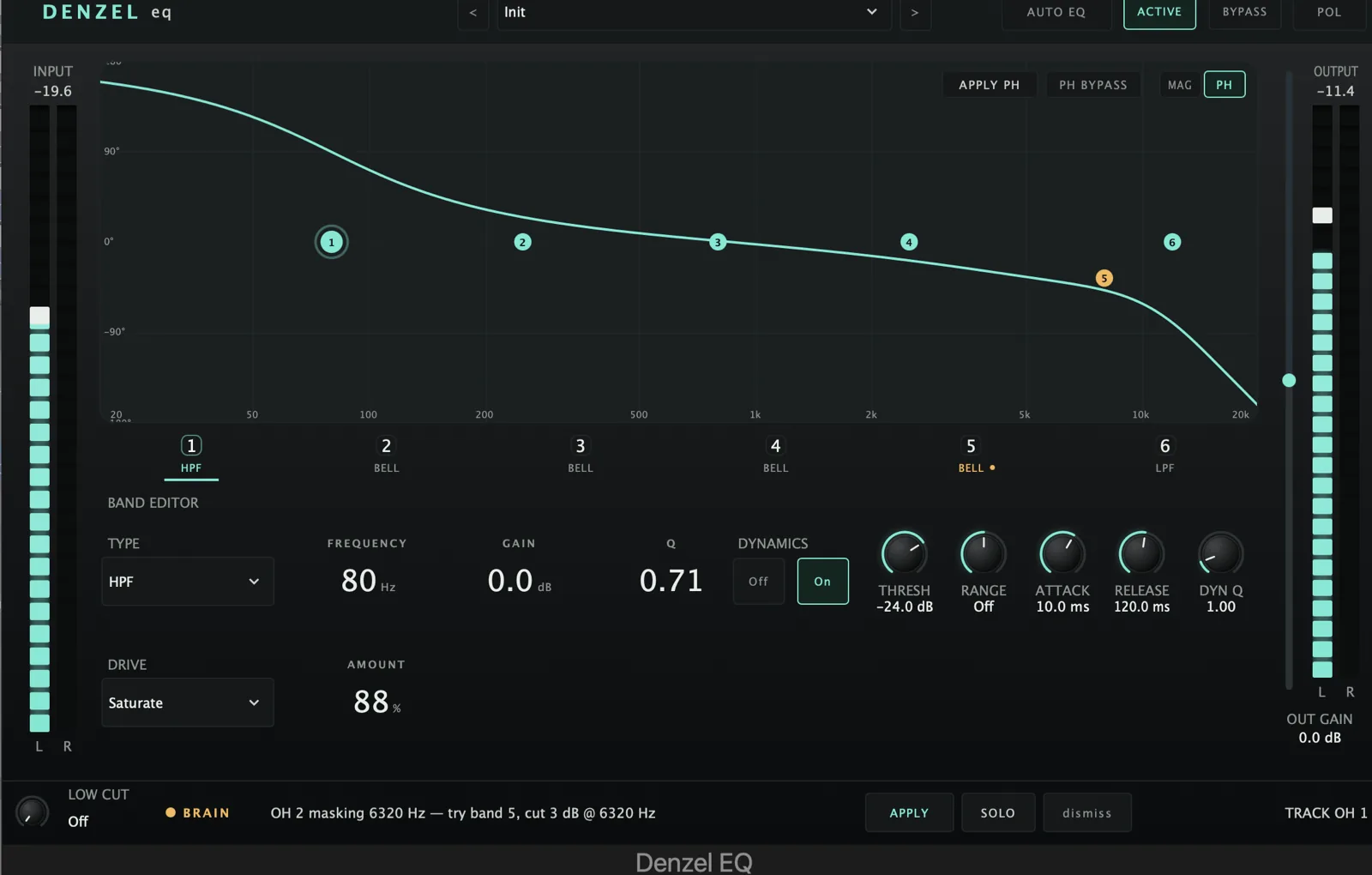 12345678
Back on MAG - a phase slot is active and all six bands are still yours
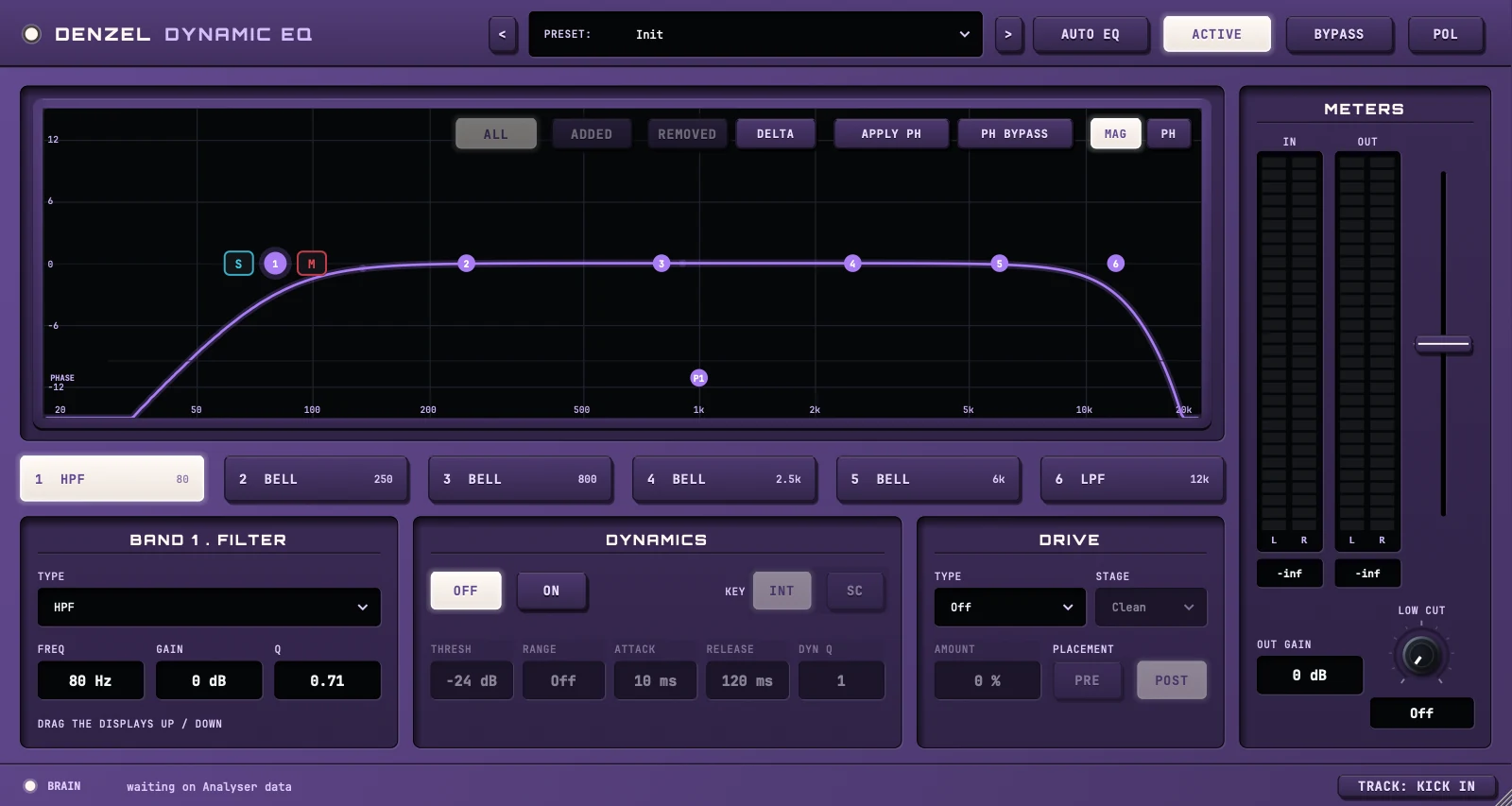 12
12Quick start
- Put it after Analyser; fill the TRACK name field so it ties to its Analyser channel.
- Leave AUTO EQ on to let the brain pick the spectrally-best EQ preset for the track.
- Per band: pick a Type, set Freq / Gain / Q; enable Dynamics and set Range (negative = down, positive = up).
- Use the Brain — Clash Suggestions cards to drop a corrective cut with one click.
Per band (×6)
Off, HPF, Low Shelf, Peaking, High Shelf, LPF, Notch. Phase is NOT here any more - it has its own section, so a phase fix never spends a band. The old Phase entry is greyed out; an older session’s phase band is moved into a real slot on load and the band handed back.
20 Hz–20 kHz, ±24 dB, Q 0.1–18. Drag the band node on the interactive curve, or use the controls.
On, Threshold, Range (±24 dB — negative = downward/compressive, positive = upward/expansive), Attack, Release, and a separate dynamics Q. Upward is the rare part: presence lifts and “air while soft”.
Per band, with Dynamics on: Int listens to this track in that band; SC listens to the external sidechain input through the same band filter. Classic use: dip a guitar’s 2–4 kHz only while the vocal sings. The key track is picked in the DAW’s sidechain menu.
Per-band distortion. Shaper: Off / Saturate (soft, gentle) / Drive (harder, slightly asymmetric) / Bitcrush (12 bits down to 3 — genuine digital artefact) / Wavefolder (folds the band back on itself, up to ~40x over) / Fuzz (normalises the band against its own envelope first, so it distorts identically at any input level — the only one that does) / Vacuum (a fixed-threshold limiter on a deliberately WIDE bandpass, so the band’s own gain decides how hard it hits and a loud centre drags its neighbours down). Bitcrush, Wavefolder, Fuzz and Vacuum are oversampled so their harmonics do not alias back down the spectrum. A bandpass isolates the region, the shaper bends a copy, and only the difference is summed back — so 0% is bit-for-bit clean and colour stays local. Note the tanh shapers (Saturate, Drive) are nearly linear at small signals, so most of what they add is a level lift of that band with the distortion well underneath; Bitcrush and Fuzz are the ones that genuinely make harmonics.
Chosen independently of the shaper, and applied after it — an amp’s gain stage and output stage are separate decisions, so Bitcrush into Class AB is a thing you can ask for. Clean (identity), Class A (single-ended, asymmetric → EVEN harmonics), Class AB (a sliver of bias closes most of the dead zone), Class B (push-pull with a real dead zone → purely ODD), Broken (a supply that cannot hold the negative half up). Class B and AB are the only stages in the plugin that get dirtier as the source gets quieter — the dead zone is a fixed size, so a quiet band spends proportionally more of its life inside it.
Where the drive sits relative to this band’s filter. Post (default) drives the band’s output, so the EQ — including whatever the dynamics are doing — rides how hard it distorts, and the harmonics are not re-filtered afterwards. Pre drives the band’s input, so the drive is constant whatever the curve does and the EQ then shapes the harmonics it just made. With the band at 0 dB gain the two are bit-identical (both orders are linear filters in series, which commute); band gain is what separates them.
Gates the whole drive block — shaper and output stage alike — which is how the circuit behaves: an output stage distorts according to how hard it is driven. So a stage chosen while Amount is 0 does nothing, and the class box DIMS to say so (dim, not disabled — picking a class is what makes Amount worth turning). Amount scales the effect twice, the shaper’s own intensity and the residue mix, so it grows roughly with the square of the knob and the bottom of the range is close to inert.
S and M sit either side of the selected band’s node. Solo plays only that band’s area; mute plays everything except it. The area follows the band type: a bell, notch or phase band covers its own frequency and width, a low shelf or high-pass everything below its frequency, a high shelf or low-pass everything above. Whatever you cannot hear is greyed out on the plot - red stripes where a mute took it, grey where a solo left it out - and a SOLO or MUTE tag sits on the band’s tab, so a muted band is obvious even when another is selected. One band can be soloed at a time and solo wins over mutes; any number can be muted. Listening aids: not automatable, and every session opens with nothing soloed or muted.
DELTA (above the plot) plays only what Denzel is changing. ALL: every change, up and down. ADDED: only what the boosts and the drive put in. REMOVED: only what the cuts take away, heard as the missing part of the original. It works band by band in frequency, so a frequency whose level did not change stays silent even where the EQ shifted its phase. Solo and mute work on it too: DELTA with a band soloed plays just what that band is doing. Adds about 20 ms of latency while it is on (the DAW compensates), and none when it is off.
The standout feature, and separate from the EQ. Four dedicated 2nd-order all-pass slots with unity magnitude at every frequency - they change nothing about tone or level, guaranteed at the coefficient level - while rotating phase up to 360° around freq, Q setting how tightly the rotation clusters. Phase, not EQ, is what fixes comb filtering and timing smear between mics (snare top vs bottom, DI vs amp, multi-mic kits): you can phase-align two sources without a sample delay and without flipping polarity. Because the slots are their own parameters, fixing phase leaves all six EQ bands free - and AUTO EQ and the brain’s EQ apply cannot touch them.
MAG is the familiar magnitude response. PH switches the whole lower half of the plugin to the phase section, and the plot to a measurement: per-third-octave correlation against a partner track - green above the line where the two reinforce, red below where they cancel. The picker top-left chooses the partner (Auto takes whichever this track cancels against worst). A white line shows your own rotation, moving as you drag. AFTER DENZEL is the same measurement taken on the plugin’s output - the answer to “did the fix work?”. Needs an Analyser on both tracks and DAW track names; without them it falls back to a plain phase-response curve and says so.
Suite integration — the clever parts
One face. A lit screen with the curve (MAG) or phase view (PH) and the phase tools in its corner; six band chips (number, type, frequency; a dot when that band's dynamics are on); the selected band's Filter / Dynamics / Drive wells; a meter bridge with IN, OUT, the output fader, OUT GAIN and LOW CUT; a footer with the brain's suggestion, CLASHES and TRACK. The software panel and the silver CLASSIC face are gone.
Each track type has a *set* of candidate EQ presets; Denzel reads the track’s accumulated spectrum (measured by Analyser upstream) and applies the one whose corrective moves best fit the actual imbalance. A de-esser is chosen only when genuinely sibilant; a mud cut only when muddy.
When Analyser flags this track masking another, Denzel shows a card in Brain — Clash Suggestions with partner name, range, severity, a one-click Add Cut, and a Solo button (session-wide audition). Once a Denzel cut lands, the card shows SEVERITY 62% → 18% post-EQ.
The key that ties this instance to its Analyser channel. Auto-filled from the host; editable when the host sends no name or it doesn’t match. The empty-clash state names which of the three failure modes applies.
Defaults OFF, and there is deliberately no auto-apply the moment a track is named — that fired before any audio had played, so every acoustic guitar in a session got the same safe default. Settings arrive from the master Analyser’s ANALYSE pass, which lands on every Denzel regardless of this toggle; turning AUTO on catches a track that was not playing during that window. It can never touch the phase slots, because those are not band parameters at all. The first user edit of a band turns it off.
Fills the dedicated phase slots — it can never spend an EQ band. It does one of two things and tells you which. FIT: when the direction of the phase difference is recoverable it is a real optimisation, finding the (freq, Q) per slot that minimises the cancellation, weighted toward the frequencies your material actually has energy in; a slot that cannot buy about 2° is left off rather than filled for the sake of it. PLACE: when it is not yet recoverable, one slot per finding at the finding’s centre — and that placement is itself what makes the direction readable, so a second click a moment later fits properly. The button flashes FITTED or PLACED.