ManualTK Gate plugin →
TK Gate
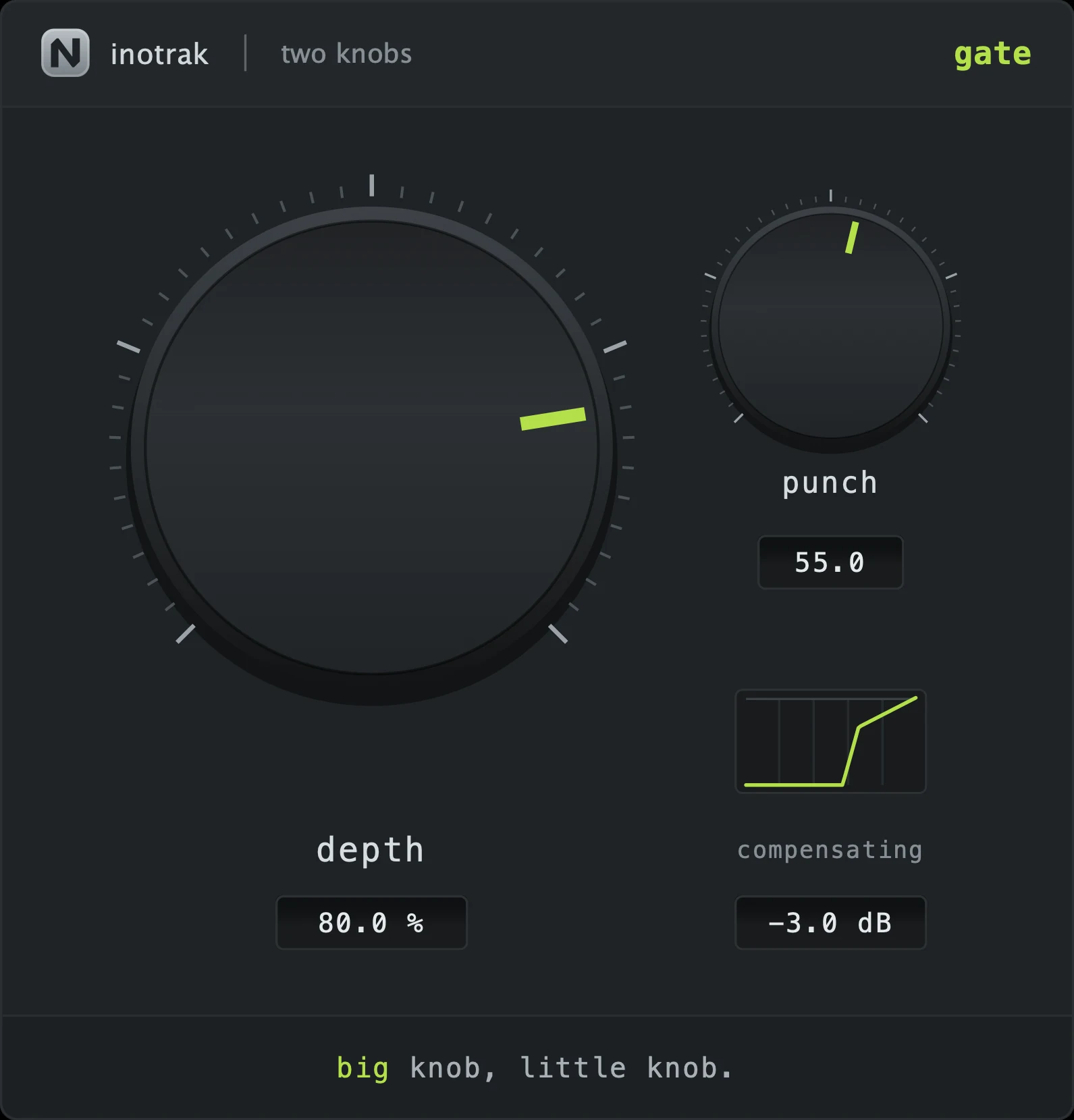
A gate whose depth knob walks from genuinely inert to a hard gate, moving threshold and range together. The detector adapts on its own - weighting peak detection on transient material and RMS on sustained material - so the same knob works on a snare and on a sustained guitar without being told which is which. A punch knob fires a short boost on the opening edge: the thing that makes a gated snare sound like it was hit harder.
The interface - every control mapped
 12345
12345Quick start
- Turn depth up until the spill drops away. At zero it genuinely does nothing.
- If the gate is chattering, back depth off slightly rather than hunting for a hold control - there isn’t one.
- Add punch to put the crack back on a drum that has been tightened.
- The detector adapts to the material, so the same setting works on a snare and a sustained guitar.
The two knobs
Threshold and range, together. It walks from inert to hard gate: at zero the threshold is below anything real and the range is zero, so it genuinely does nothing. As it climbs, the threshold comes up to meet the signal and the closed floor drops away. The travel is spread evenly across the knob rather than bunched - there is no dead quarter at the bottom.
A short boost fired on the opening edge - the thing that makes a gated snare sound like it was hit harder. It is a gain envelope, not a distortion: this is the one plugin in the series with no saturation anywhere in it, and that is deliberate.
Detection
Weights peak detection on transient material and RMS on sustained material, continuously, so the same knob position works on a snare and on a sustained guitar without you having to tell it which is which.
What to reach for it on
Tom mics, a snare bottom, a guitar amp with a noisy pedalboard, a room mic you want tightened rather than removed.
Shared across the series
The same on all six, so learning one teaches you the set.
Input is level-matched to output continuously, so turning the big knob up never simply makes things louder - you hear the effect, not the volume. The compensating readout under the little knob shows what it is doing right now: negative means the plugin made things louder and the compensation is pulling back. It takes about a second to settle after a big move, deliberately - a compensator that reacts instantly is a compressor. TK Compressor is the one exception: its level rises with squeeze (see its own section).
Drag up and down to adjust. Hold shift while dragging for fine adjustment. Double-click a knob to return it to its default. You can also double-click a value readout and type a number.
A small live curve under the little knob showing what the plugin is currently doing to the signal - the transfer curve, the filter shape or the gate contour, depending on the plugin. It follows both knobs and the toggle.
Drag any edge. The aspect ratio is locked, the range is 60 %-200 %, and the size is remembered with the session. Everything stays readable at the bottom of that range.
No preset browser, no meter, no gain-reduction display, no A/B, no settings gear. Nothing to configure and nothing shared with any other plugin - these hold no cross-plugin state and behave identically with none of the rest of the suite installed.