ManualTK Limiter plugin →
TK Limiter
A bus limiter with one crush knob that drives harder into a fixed ceiling while shortening the release, taking you from gentle peak control to full density. The ceiling never moves and the output is level-matched to the input, so turning it up does not make things louder - it makes them *denser*, which is the only honest way to audition a limiter. A dirt knob blends saturation in ahead of it, inside the same oversampled path.
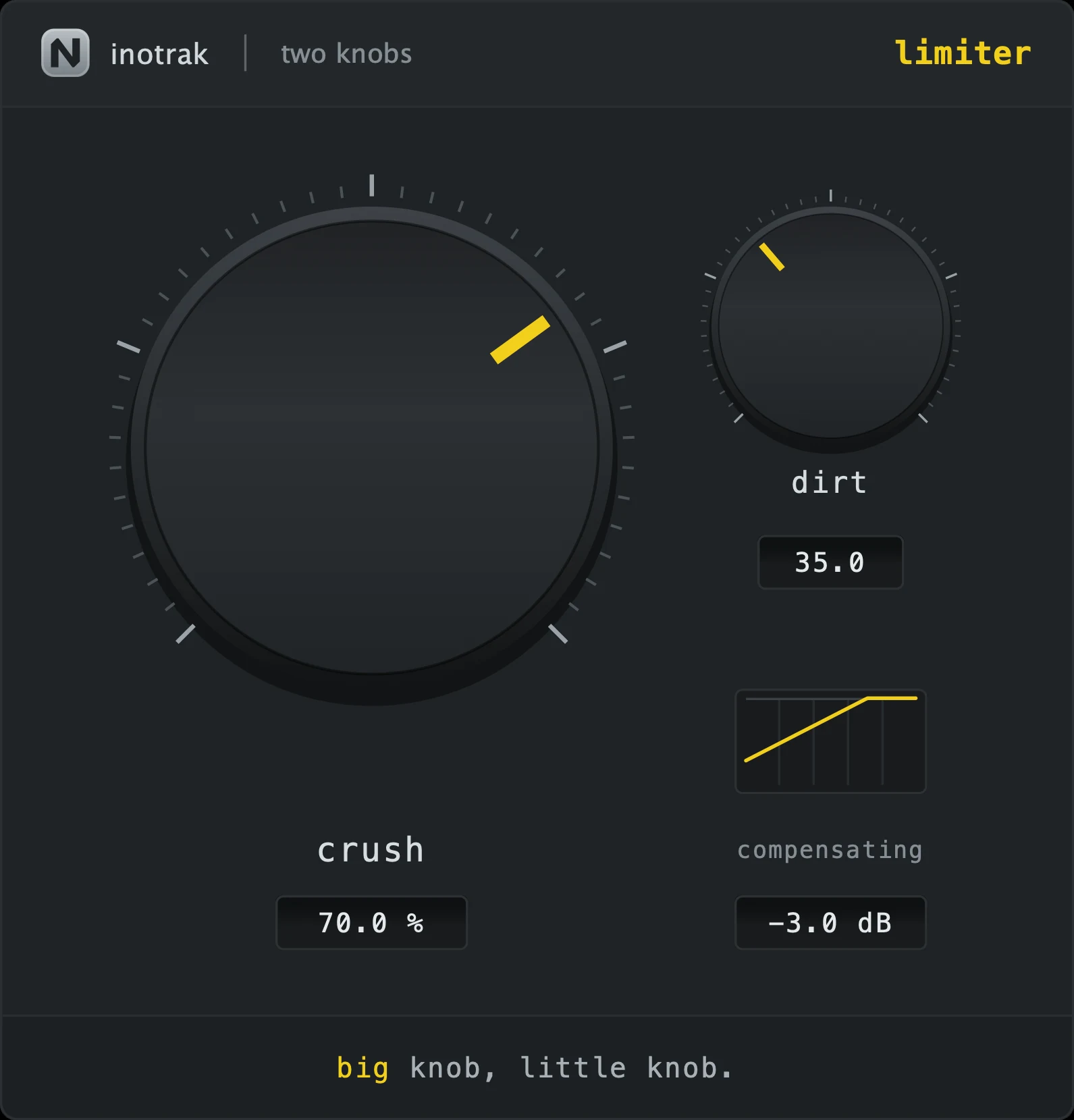
The interface - every control mapped
 12345
12345Quick start
- Put it on the bus and turn crush up until the density is where you want it.
- Because the level is matched, listen for the material getting *thicker* rather than louder - that is the thing to judge.
- Add dirt if you want harmonic weight in front of the limiting; at zero it is completely clean.
- For a final mastering limit, reach for Hodor instead - this is a bus tool.
The two knobs
Density. It drives the signal harder into a fixed ceiling while shortening the release, so one knob spans gentle peak control to full density. The ceiling never moves, and the auto-gain compensation pulls the output back to the input loudness - so this knob cannot make anything louder, only denser.
Blends saturation ahead of the limiter, inside the same oversampled path - so its harmonics are caught by the true-peak stage rather than escaping past it. At zero it is completely clean.
Ceiling & safety
The output is a true-peak limit at -0.3 dBTP. The auto-gain compensation on this plugin can only ever pull *down*, never push up, so nothing can leave above that ceiling - the compensator cannot undo the limiting.
What to reach for it on
A mix bus, a drum bus, a stem you need to fit under something else. Not as a mastering limiter of last resort - that is what Hodor is for.
Shared across the series
The same on all six, so learning one teaches you the set.
Input is level-matched to output continuously, so turning the big knob up never simply makes things louder - you hear the effect, not the volume. The compensating readout under the little knob shows what it is doing right now: negative means the plugin made things louder and the compensation is pulling back. It takes about a second to settle after a big move, deliberately - a compensator that reacts instantly is a compressor. TK Compressor is the one exception: its level rises with squeeze (see its own section).
Drag up and down to adjust. Hold shift while dragging for fine adjustment. Double-click a knob to return it to its default. You can also double-click a value readout and type a number.
A small live curve under the little knob showing what the plugin is currently doing to the signal - the transfer curve, the filter shape or the gate contour, depending on the plugin. It follows both knobs and the toggle.
Drag any edge. The aspect ratio is locked, the range is 60 %-200 %, and the size is remembered with the session. Everything stays readable at the bottom of that range.
No preset browser, no meter, no gain-reduction display, no A/B, no settings gear. Nothing to configure and nothing shared with any other plugin - these hold no cross-plugin state and behave identically with none of the rest of the suite installed.