ManualG-Root Guitar Amp Sim plugin →
G-Root Guitar Amp Sim
A guitar amp built as an ORDERED RACK: the eight amp stages (Gain, Drive, Bass, Mid, Treble, Presence, Power, Cab) sit on one signal chain, and you DRAG PEDALS into any insert point BETWEEN them — pre-amp, between any two amp knobs, or post-amp before the cab. Twelve palette pedals (EQ, Graphic EQ, Distortion, Reverb, Delay, Compressor, Limiter, Gate, De-Esser, Wah, Tremolo, Bit Crush), each a zero-latency stompbox you place, reorder and reroute by dragging. Same amp voicing as the shipping amp sim, new rack around it. Self-contained — no shared brain.
The interface - every control mapped
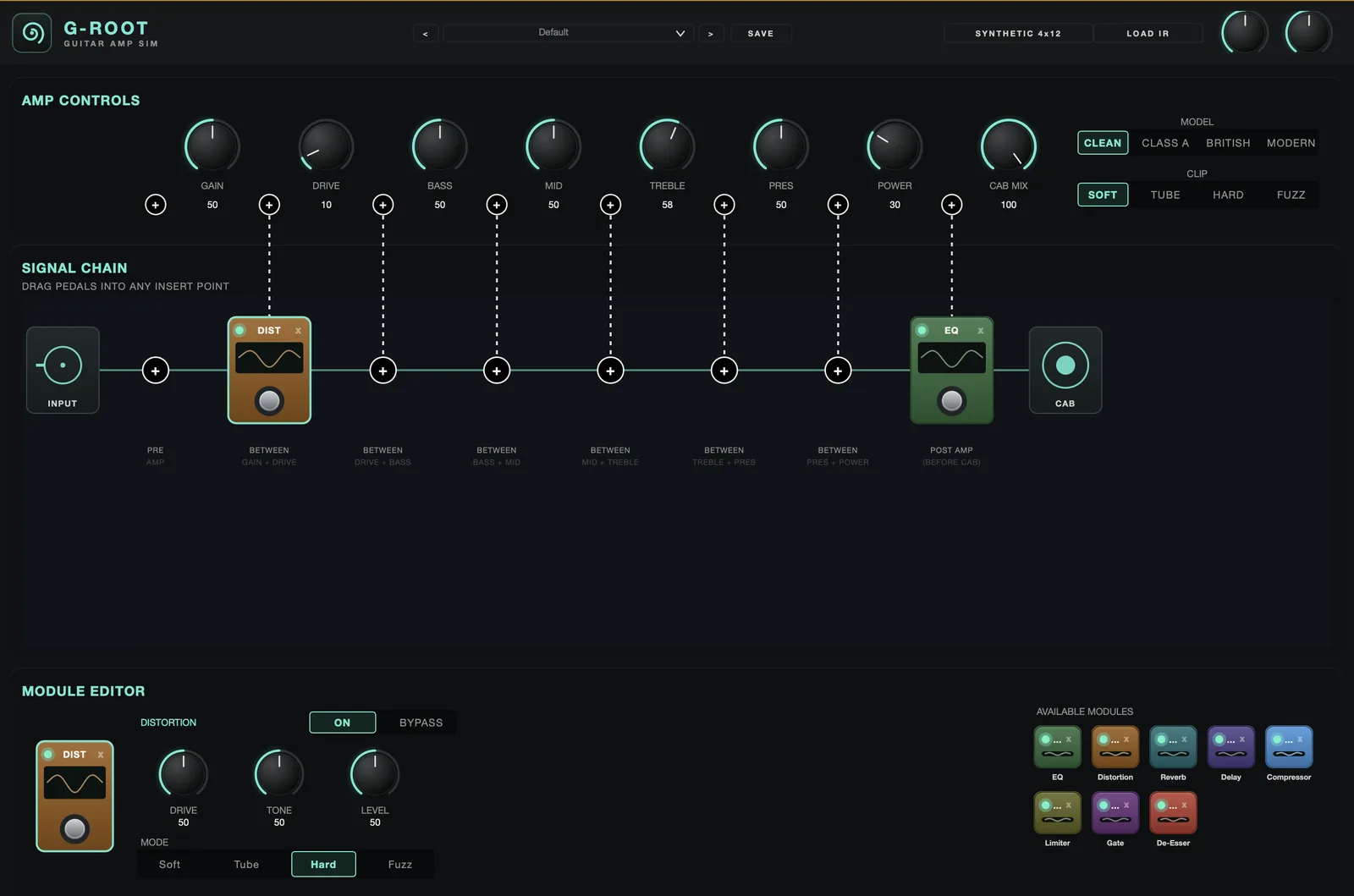 123456789101112
< > step presets.Quick start
- Insert on a guitar track. It runs mono in / mono out and mono in / stereo out, so it appears on a mono track’s insert menu as well as a stereo one — the amp is mono end to end either way.
- Watch the IN meter in the header while you play: a DI peaking around its mark (-18 dBFS) is where the amp was voiced. Trim with the IN box (drag up / down).
- Set the amp: Gain / Drive, the Bass / Mid / Treble / Pres tone stack and Power; pick a Model (Clean/Class A/British/Modern) and Clip (Soft/Tube/Hard/Fuzz). For cleaner tones, switch DRIVE RANGE to LOW.
- Drag pedals from the PEDALS palette (beside the board) onto any + insert point in the SIGNAL CHAIN — before the amp, between any two stages, or post-amp before the cab. A new G-Root opens with an empty board.
- Click a placed pedal to put it on the bench below the board - the pedal drawn large with its own knobs and footswitch, and its ROUTING beside it. Drag a pedal to reroute it, drag it above/below another pedal at the same point to reorder, or x to remove it.
- Set the cab — SYNTHETIC 4x12 or load a cab IR — and blend with CAB MIX; save the rig from the header preset bar.
Amp controls
The amp’s two front stages, split so BETWEEN GAIN + DRIVE is a real insert point: Gain trims into the voicing, Drive is the distortion amount. On DRIVE RANGE HIGH the pre-gain is generous, so even a quiet DI saturates.
HIGH / LOW, left of the amp knobs. HIGH is the original DRIVE: past about a fifth of the knob the amp is already distorting (British: +23 dB into the clipper at 50, +34 dB at 100). LOW is gentler - the lower half of DRIVE runs from clean to crunch and full distortion is at the top (British: +8 dB at 50, +20 dB at 100). Sessions and presets saved before the switch existed open on HIGH and sound exactly as they did. Starting points to tune by ear.
Model (Clean / Class A / British / Modern) sets the voicing; Clip (Soft / Tube / Hard / Fuzz) sets the distortion curve.
Bass / Mid / Treble / Presence, guitar-voiced and interactive. Each is also an amp STAGE, so there is an insert point on either side of it.
The power-amp stage — the last amp colour before the cab.
The cab button names the current cab — SYNTHETIC 4x12 or a loaded IR. LOAD IR loads your own cab impulse (.wav / .aif, zero latency, persists with the session); clicking the cab-name button reverts to the synthetic cab. Loaded IRs are level-normalised so any IR sits at a consistent loudness (no more very-quiet cabs). CAB MIX blends the cab against the un-cabbed amp.
The header’s IN and OUT boxes are input / output trim (drag up / down, double-click for 0 dB), each beside a horizontal meter. IN is measured after the IN trim, so it shows what the amp is actually fed; its mark is -18 dBFS, about where a DI sits when it is gain-staged the way the amp was voiced. Hotter drives every DRIVE setting harder.
Signal chain — drag-in pedals
A labelled + sits before EVERY amp stage — PRE AMP, BETWEEN GAIN+DRIVE, BETWEEN DRIVE+BASS, BETWEEN BASS+MID, BETWEEN MID+TREBLE, BETWEEN TREBLE+PRES, BETWEEN PRES+POWER and POST AMP (before the cab). A pedal dropped there processes exactly at that spot.
Drag a pedal from the PEDALS palette onto a point to place it (every point lights up while you drag); drag a placed pedal to another point to reroute; x removes it. Type is fixed by what you drag — no type or routing dropdowns.
Several pedals can share one insert point; they run top-to-bottom, and dropping a pedal above or below another sets that order — an EQ above a Distortion runs BEFORE it. A tall pile fans out so every pedal stays in the window.
The selected pedal, drawn large below the board in its own colour with its own knobs (mode choices as chips, the Graphic EQ as sliders), and the same readouts in real units (Hz, dB, ms). It is never blank once a pedal is placed, and it remembers its pedal when you reopen the window.
Each pedal’s footswitch or LED - on the board or on the bench - switches it between ON and BYPASS (it goes dim and grey when bypassed). A steady-bypassed pedal is skipped (zero CPU, transparent); toggling crossfades ~8 ms so it never clicks, and every module is zero-latency so bypass never shifts timing.
Every pedal is SERIES (in the chain) or PARALLEL - the SERIES / PARALLEL chips in ROUTING, beside the bench. A parallel pedal taps the signal where it sits, processes a private copy and mixes it back in later — the main chain carries straight on underneath, so it ADDS rather than replaces. REJOIN picks where the copy returns: PRE-CAB sends it through the speaker cab with everything else, POST-CAB rejoins after the cab so the branch is raw and un-cabbed. MIX sets how much of the branch you hear. REJOIN and MIX are dimmed while the pedal is in SERIES, where they do nothing. The rack draws the branch as a white line running out of the pedal and back into the signal.
Every pedal has an OUT knob (in ROUTING), -24 to +24 dB. It is applied after the pedal and before the parallel mix, so it sets a parallel branch’s level as well as a series one. Bypassing the pedal returns the trim to unity, so bypass stays properly transparent.
Pedals (the PEDALS palette)
Three static peaking bands (low / mid / high), freq + gain each.
Nine fixed bands, one slider each, ±15 dB - on the bench it shows as nine vertical sliders. G-Root: 100 · 200 · 400 · 600 · 800 · 1.6k · 3.2k · 4.5k · 6k Hz. B-Root: 60 · 120 · 250 · 500 · 750 · 1k · 2.5k · 4k · 6k Hz. Its level is the OUT knob every pedal has. The three-band EQ is still there beside it.
Drive · Tone · Level · Mode (Soft / Tube / Hard / Fuzz) — oversampled, zero latency.
Reverb (Mix · Decay · Size · Damping · Type Plate/Room/Hall · Predelay) and Delay (Time · Feedback · Mix · Tone) — the Wallace / Tackleberry cores as compact mono pedals.
Compressor (Threshold · Ratio · Attack · Release · Makeup), Limiter (Threshold · Release · Ceiling — instant, ceiling-clipped, no lookahead) and Gate (Threshold · Range · Attack · Release · Hold) — the Stig / Hodor / Zuul cores.
Freq · Threshold · Amount — Tyson’s subtractive band, one band.
A resonant sweep into fuzz: Pedal · Rate/Sens · Reso · Drive · Mode · Blend. Because there is no treadle under your foot, Mode picks how the sweep moves — Manual parks it (the cocked-wah sound), Auto opens it with your playing dynamics, LFO sweeps it continuously. Rate/Sens is the LFO speed in LFO and the sensitivity in Auto. Drive at 0 is clean.
Rate · Depth · Shape · Duty · Mode · Level. Shape morphs the wave continuously from a smooth sine to a hard square; Duty skews it, so short duty with a hard shape is a stutter and long duty is a swell. Mode: Amp (classic level chop), Harmonic (the brownface trick — the low and high halves move in opposite directions, so the tone rocks dark-to-bright rather than loud-to-quiet) and Bias (breathes and adds harmonics rather than chopping). Free-running in Hz — there is no host tempo sync yet.
Digital destruction: Fold · Crush · Rate · Tone · Mode · Blend. Mode picks the shaper — Fold (the signal reflects at the rails, adding a new harmonic series per fold), Wrap (jumps hard to the opposite rail — the nastiest), Rectify (octave-up fizz) and Sine (rich but rounder). Crush drops the bit depth from 16 to 1; Rate decimates the sample rate down to 500 Hz. It is deliberately not anti-aliased — the inharmonic ring is the effect.