ManualHodor Limiter plugin →
Hodor Limiter
A true-peak brickwall limiter for the master or bus. One shared oversampled path carries a pre-limit distortion stage into a lookahead true-peak limiter, then a ceiling clip, M/S-or-L/R stereo basis, dither and BS.1770-4 LUFS + true-peak + PSR metering. Self-contained — it is NOT a Levels-brain participant; its auto-config comes from its OWN 10-second Analyse window.
The interface - every control mapped
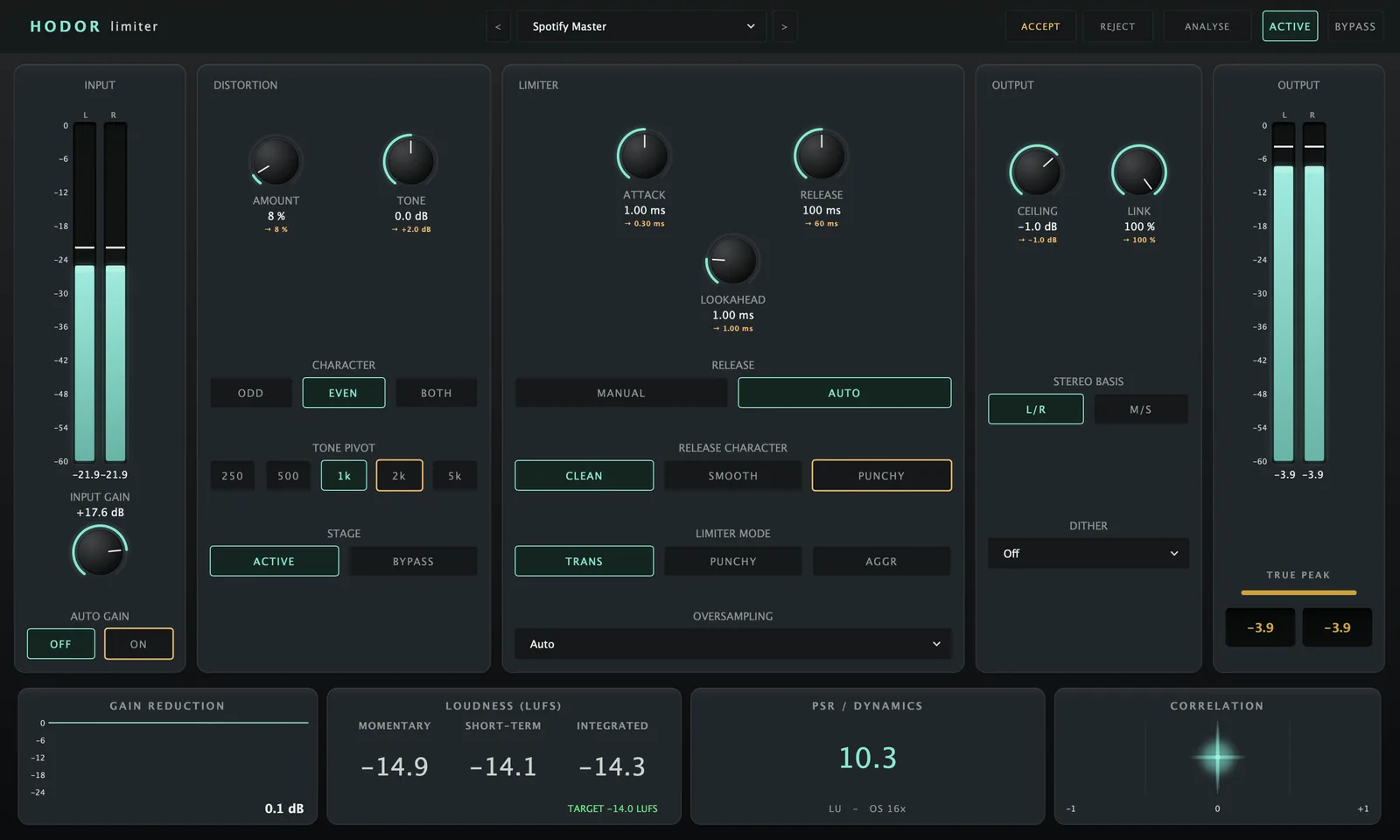 1234567891011121314
< > step them.Quick start
- Insert Hodor last on the master (or bus) chain.
- Press ANALYSE and choose a delivery target (Spotify, Apple Music, YouTube, Tidal, Club / Dance, Transparent, CD / Broadcast).
- Play your loudest section for 10 seconds — Hodor proposes a full setting, marking each change in cyan under its control.
- Press ACCEPT to apply, nudge any control to tweak, or REJECT to discard. Watch the Ceiling hold — at 2× oversampling and above it stays under; at Off it sits on the line.
Analyse & AutoConfig
A local analysis brain — its own input only. Not the shared Levels brain.
Opens a dialog to pick the delivery target, then captures 10 s of input and computes a full paramID → value proposal. Measurements + proposal + overlay serialise into the session, so a reopened project recalls everything with no re-analysis.
Appear in the header only while a proposal is pending. ACCEPT applies the ghosts; REJECT discards them. Nothing changes audio until you Accept — tweaking any single control resolves that one ghost in place.
Choosing a different target re-proposes from the existing measurements — no second Analyse pass needed.
LevelsBrain.cpp and shares no session-wide state. All auto-config is from its own Analyse window. Do NOT expect it in the master Analyser’s ANALYSE broadcast.Input & Distortion
Input Gain (−30…+30 dB) drives the limiter. Auto Gain level-matches the output so a louder-driven setting stays fair to A/B against a quieter one.
Adds harmonics before limiting, so the limiter catches them — loudness + character without overs. Amount 0–100% (0 = clean bypass), Character Odd/Even/Both, Tone a ±6 dB tilt around a selectable Pivot (250 Hz–5 kHz), Stage ACTIVE/BYPASS to A/B its contribution.
Limiter
Attack = how fast it clamps (faster cleaner but can pump). Release + Auto (adapts fast for transients, slow for sustained).
Clean (minimal), Smooth (longer), Punchy (fast with a brief hold to keep transient snap).
Transparent (cleanest), Punchy (keeps snap), Aggressive (soft-clips before the peak stage for maximum loudness). Also scales Attack for you.
Lookahead 0–5 ms (cleaner, adds reported latency). Oversampling Auto / 2× / 4× / 8× / 16× for true-peak catching — a factor change is an index swap (no audio-thread alloc) and re-reports latency to the host.
Output, stereo & metering
The output limit (−3…0 dB, default −1 dB — lossy codecs rebound by up to a decibel, so the headroom is deliberate). What holds it is the true-peak trim before the dither, not the safety clip after it: a clip bounds the *sample* peak and is what creates the high frequencies whose inter-sample peaks overshoot. At 2× oversampling and above the true-peak output stays under the ceiling; at Off it sits on the line.
Link 0–100% (100% moves both channels together; lower lets them limit independently). Basis L/R or M/S (limits Mid and Side separately, for mastering). M/S is never applied automatically — Analyse only *proposes* it.
Off / TPDF / noise-shaped at a 16- or 24-bit target, with a safety clip after it.
GR gain reduction (peak-hold). True Peak Out with an over indicator (CLEAR resets). LUFS Momentary/Short/Integrated (BS.1770-4) with the target shown (RESET restarts integration). PSR real-time dynamics (peak vs short-term loudness).