

The Levels suite
Hodor Limiter
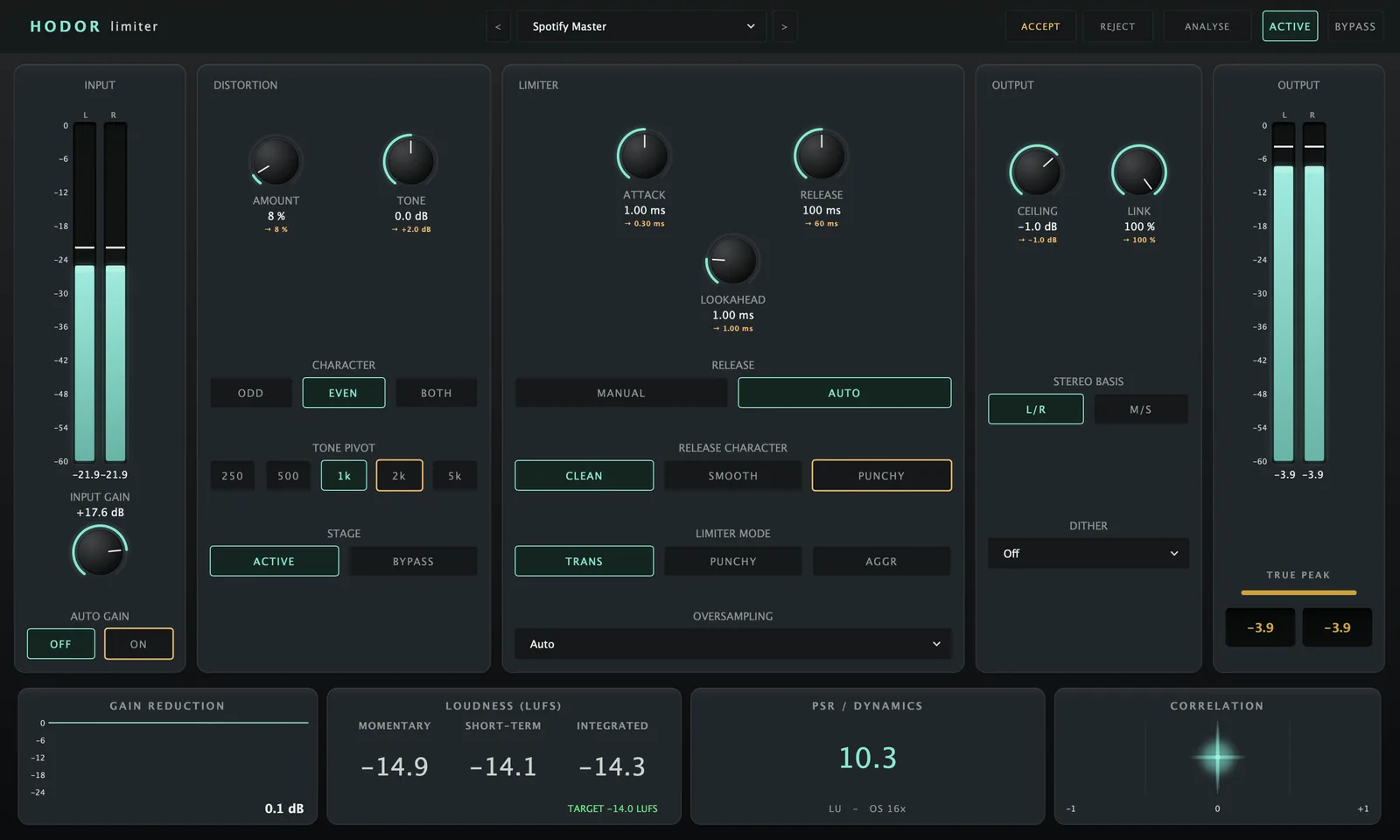
Get loud and add harmonic saturation at the same time. The distortion sits before the limiter in the same oversampled path, so it drives the limiter rather than fighting it.
AU · VST3 · Standalone - not Pro Tools (no AAX). Formats and requirements.
Price includes VAT. Nothing is added at checkout.
Every update included
One price, and it is yours for good: every future update to what you buy is included at no extra cost. There is no subscription and no upgrade fee.
A true-peak brickwall limiter for the master or bus. One shared oversampled path carries a pre-limit distortion stage into a lookahead true-peak limiter, then a ceiling clip, M/S-or-L/R stereo basis, dither and BS.1770-4 LUFS + true-peak + PSR metering. Self-contained - it is NOT a Levels-brain participant; its auto-config comes from its OWN 10-second Analyse window.
demo
See it work.
what's in it
Every control, and what it's for.
Analyse & AutoConfig
A local analysis brain - its own input only. Not the shared Levels brain.
Opens a dialog to pick the delivery target, then captures 10 s of input and computes a full paramID → value proposal. Measurements + proposal + overlay serialise into the session, so a reopened project recalls everything with no re-analysis.
Appear in the header only while a proposal is pending. ACCEPT applies the ghosts; REJECT discards them. Nothing changes audio until you Accept - tweaking any single control resolves that one ghost in place.
Choosing a different target re-proposes from the existing measurements - no second Analyse pass needed.
Input & Distortion
Input Gain (−30…+30 dB) drives the limiter. Auto Gain level-matches the output so a louder-driven setting stays fair to A/B against a quieter one.
Adds harmonics before limiting, so the limiter catches them - loudness + character without overs. Amount 0–100% (0 = clean bypass), Character Odd/Even/Both, Tone a ±6 dB tilt around a selectable Pivot (250 Hz–5 kHz), Stage ACTIVE/BYPASS to A/B its contribution.
Hodor Limiter
£29 - every future update included, no subscription.
Limiter
Attack = how fast it clamps (faster cleaner but can pump). Release + Auto (adapts fast for transients, slow for sustained).
Clean (minimal), Smooth (longer), Punchy (fast with a brief hold to keep transient snap).
Transparent (cleanest), Punchy (keeps snap), Aggressive (soft-clips before the peak stage for maximum loudness). Also scales Attack for you.
Lookahead 0–5 ms (cleaner, adds reported latency). Oversampling Auto / 2× / 4× / 8× / 16× for true-peak catching - a factor change is an index swap (no audio-thread alloc) and re-reports latency to the host.
Output, stereo & metering
The output limit (−3…0 dB, default −1 dB - lossy codecs rebound by up to a decibel, so the headroom is deliberate). What holds it is the true-peak trim before the dither, not the safety clip after it: a clip bounds the sample peak and is what creates the high frequencies whose inter-sample peaks overshoot. At 2× oversampling and above the true-peak output stays under the ceiling; at Off it sits on the line.
Link 0–100% (100% moves both channels together; lower lets them limit independently). Basis L/R or M/S (limits Mid and Side separately, for mastering). M/S is never applied automatically - Analyse only proposes it.
Off / TPDF / noise-shaped at a 16- or 24-bit target, with a safety clip after it.
GR gain reduction (peak-hold). True Peak Out with an over indicator (CLEAR resets). LUFS Momentary/Short/Integrated (BS.1770-4) with the target shown (RESET restarts integration). PSR real-time dynamics (peak vs short-term loudness).
quick start
Four steps to a sound.
- Insert Hodor last on the master (or bus) chain.
- Press ANALYSE and choose a delivery target (Spotify, Apple Music, YouTube, Tidal, Club / Dance, Transparent, CD / Broadcast).
- Play your loudest section for 10 seconds - Hodor proposes a full setting, marking each change in cyan under its control.
- Press ACCEPT to apply, nudge any control to tweak, or REJECT to discard. Watch the Ceiling hold - at 2× oversampling and above it stays under; at Off it sits on the line.
Not currently suitable for Pro Tools
These are AU and VST3 plugins. Pro Tools only loads AAX, which these aren't built as - so none of the suite will appear in it. Please check your DAW before you buy - once you download, the sale is final.
Get Hodor Limiter
AU · VST3 · Standalone - macOS 10.15 Catalina or later, Windows (VST3). Installers are not yet notarised, so there's one extra click on first install; the install guide walks through it.
Try the free demo of Hodor Limiter first. Every control works; the demo just drops to silence for 2 seconds in every 30. Buy it and paste in the code you're sent, and the dropouts stop - no reinstall.
Where it's confirmed to work
Honest version: this is a one-person operation, so it has been properly tested in the DAWs below and not yet in the others. Not tested yet means exactly that - not that it fails.
| DAW | System | Plugins load | They share with each other |
|---|---|---|---|
| Logic Pro | macOS | Yes | Yes |
| GarageBand The Two Knobs plugins are confirmed in GarageBand. This one has not been tested there yet. | macOS | Not tested yet | Not tested yet |
| Ableton Live Confirmed loading on both macOS and Windows. The sharing side is still to be checked. | Mac/Win | Yes | Not tested yet |
| Cubase / Nuendo Confirmed loading on both macOS and Windows. The sharing side is still to be checked. | Mac/Win | Yes | Not tested yet |
| Studio One Confirmed on Windows (VST3). The sharing side is still to be checked. | Mac/Win | Yes | Not tested yet |
| Reaper Confirmed on Intel Mac - both AU and VST3, and the plugins share with each other. Not yet tested on Windows. | Mac/Win | Yes | Yes |
| FL Studio | Mac/Win | Not tested yet | Not tested yet |
| Bitwig Studio Confirmed loading on both macOS and Windows. Bitwig keeps plugins apart from each other by default, so the sharing side needs checking separately. | Mac/Win | Yes | Not tested yet |
| Digital Performer | Mac/Win | Not tested yet | Not tested yet |
| Pro Tools Pro Tools only loads AAX plugins. These are AU and VST3. | Mac/Win | No | No |
| System | Confirmed | |
|---|---|---|
| macOS on Intel | Yes | Confirmed working from 10.15 Catalina upwards. |
| macOS on Apple Silicon | Yes | Confirmed on an M4 Mac in Logic Pro. The installers are universal binaries, so they run natively - no Rosetta needed. |
| Windows 10 / 11 | Yes | VST3 only - there is no AU on Windows. Confirmed in Studio One, Ableton Live, Cubase and Bitwig. |
"They share with each other" is the ANALYSE pass, the clash matrix and the AUTO settings. Where a DAW keeps plugins apart, every plugin still works perfectly on its own - they just can't pass measurements between them, and nothing breaks. Ten-second check in any DAW: put Analyser on two tracks, turn one to master, and see whether the second track appears in its overview. Tell me what you find and this list gets updated.