

The Levels suite
Zuul Gate
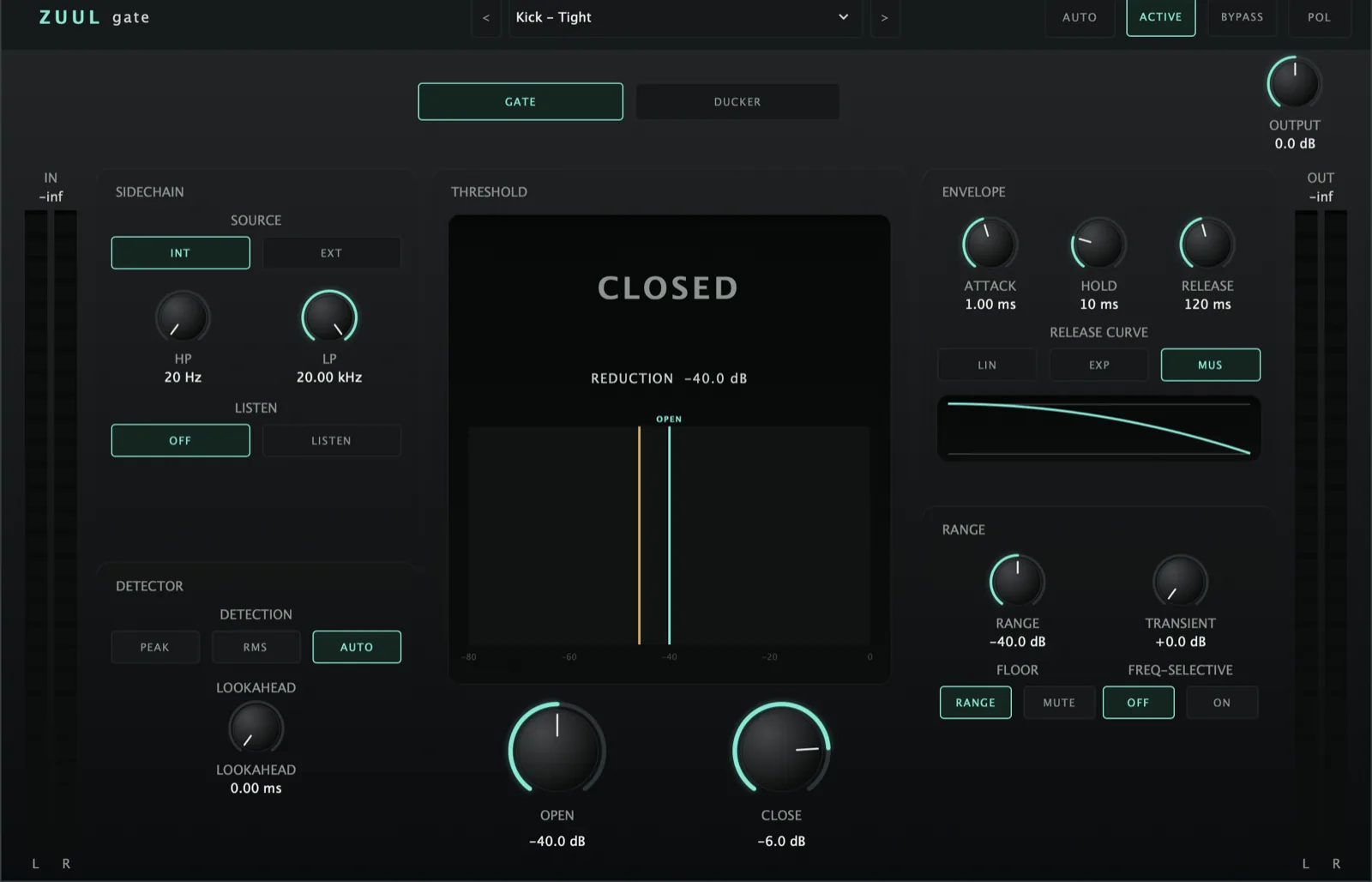
Gates set in seconds - it reads the track and places the thresholds for you. Then adds punch on the way out.
AU · VST3 · Standalone - not Pro Tools (no AAX). Formats and requirements.
Price includes VAT. Nothing is added at checkout.
Every update included
One price, and it is yours for good: every future update to what you buy is included at no extra cost. There is no subscription and no upgrade fee.
A modern gate / expander / ducker - one engine, Gate or Ducker mode, with an internal or external sidechain detector (own HP/LP + Listen), Peak/RMS/Auto detection, lookahead, open/close hysteresis, a shaped envelope and creative range tools. A brain consumer with a bespoke computed gate in AUTO.
demo
See it work.
what's in it
Every control, and what it's for.
Controls marked Brain are the ones the Analyser can set for you on an ANALYSE pass.
Detector & sidechain
Mono sum of the internal input or the external sidechain bus (may be disabled / mono / stereo).
12 dB/oct Butterworth HP (20 Hz–2 kHz) and LP (200 Hz–20 kHz) on the detector path only (never the audio). Listen routes the filtered key to the output to tune by ear.
Peak (fast follower), RMS (~15 ms window), or Auto (crest-factor hybrid - peak on transients, RMS on sustained).
Zuul Gate
£29 - every future update included, no subscription.
Gate action
Opens above Open, closes below Close (= Open + a ≤0 offset). The gap is the anti-chatter window, drawn literally on the threshold meter with the live detector level.
Flips the rest/engaged target: in Gate the loud state passes (engaged = unity); in Ducker the loud state attenuates. Everything else is shared.
Attack (one-pole) toward the engaged gain, Hold latches the open state, Release shaped by Linear / Exponential / Musical (the last slow-then-fast for natural tails).
When closed, the floor is the Range value - or full silence with Hard Mute.
0–10 ms, latency-reported to the host and bypassable. The detector reads the live key while audio is delayed, so the gain change lands slightly before the transient.
Creative extras
A short, fast-decaying leading-edge boost (0–6 dB) fired on the open edge. Off by default.
When closed, attenuation isn’t flat - a low/high-shelf tilt (fixed 250 Hz / 4 kHz corners) deepens as the gate closes, so cymbal bleed goes darker rather than just quieter. Open signal is left uncoloured. LOW / HIGH stay on screen, dimmed, until it’s switched on.
Reads a bespoke gate the brain computes from the channel’s measured data (thresholds from actual RMS/peak, hysteresis & envelope from crest, HP/LP bracketed to where energy sits) - so two snares with different tunings get different gates. Applies on the master ANALYSE broadcast and when its own AUTO is on. Any gate-shaping edit drops out.
quick start
Four steps to a sound.
- Insert after Analyser; pick Gate or Ducker mode.
- Set the Open threshold to meet your loudest wanted hits, and Close a range below (the gap is the anti-chatter window - drawn on the meter).
- Tune the detector: HP/LP filter (use Listen), Peak/RMS/Auto, and lookahead for fast transients.
- Shape the tail with Attack / Hold / Release (+ curve); or run AUTO for a gate the brain computes from measured level/crest/spectrum.
Not currently suitable for Pro Tools
These are AU and VST3 plugins. Pro Tools only loads AAX, which these aren't built as - so none of the suite will appear in it. Please check your DAW before you buy - once you download, the sale is final.
Get Zuul Gate
AU · VST3 · Standalone - macOS 10.15 Catalina or later, Windows (VST3). Installers are not yet notarised, so there's one extra click on first install; the install guide walks through it.
Try the free demo of Zuul Gate first. Every control works; the demo just drops to silence for 2 seconds in every 30. Buy it and paste in the code you're sent, and the dropouts stop - no reinstall.
Where it's confirmed to work
Honest version: this is a one-person operation, so it has been properly tested in the DAWs below and not yet in the others. Not tested yet means exactly that - not that it fails.
| DAW | System | Plugins load | They share with each other |
|---|---|---|---|
| Logic Pro | macOS | Yes | Yes |
| GarageBand The Two Knobs plugins are confirmed in GarageBand. This one has not been tested there yet. | macOS | Not tested yet | Not tested yet |
| Ableton Live Confirmed loading on both macOS and Windows. The sharing side is still to be checked. | Mac/Win | Yes | Not tested yet |
| Cubase / Nuendo Confirmed loading on both macOS and Windows. The sharing side is still to be checked. | Mac/Win | Yes | Not tested yet |
| Studio One Confirmed on Windows (VST3). The sharing side is still to be checked. | Mac/Win | Yes | Not tested yet |
| Reaper Confirmed on Intel Mac - both AU and VST3, and the plugins share with each other. Not yet tested on Windows. | Mac/Win | Yes | Yes |
| FL Studio | Mac/Win | Not tested yet | Not tested yet |
| Bitwig Studio Confirmed loading on both macOS and Windows. Bitwig keeps plugins apart from each other by default, so the sharing side needs checking separately. | Mac/Win | Yes | Not tested yet |
| Digital Performer | Mac/Win | Not tested yet | Not tested yet |
| Pro Tools Pro Tools only loads AAX plugins. These are AU and VST3. | Mac/Win | No | No |
| System | Confirmed | |
|---|---|---|
| macOS on Intel | Yes | Confirmed working from 10.15 Catalina upwards. |
| macOS on Apple Silicon | Yes | Confirmed on an M4 Mac in Logic Pro. The installers are universal binaries, so they run natively - no Rosetta needed. |
| Windows 10 / 11 | Yes | VST3 only - there is no AU on Windows. Confirmed in Studio One, Ableton Live, Cubase and Bitwig. |
"They share with each other" is the ANALYSE pass, the clash matrix and the AUTO settings. Where a DAW keeps plugins apart, every plugin still works perfectly on its own - they just can't pass measurements between them, and nothing breaks. Ten-second check in any DAW: put Analyser on two tracks, turn one to master, and see whether the second track appears in its overview. Tell me what you find and this list gets updated.