

The Levels suite
The Stig Compressor
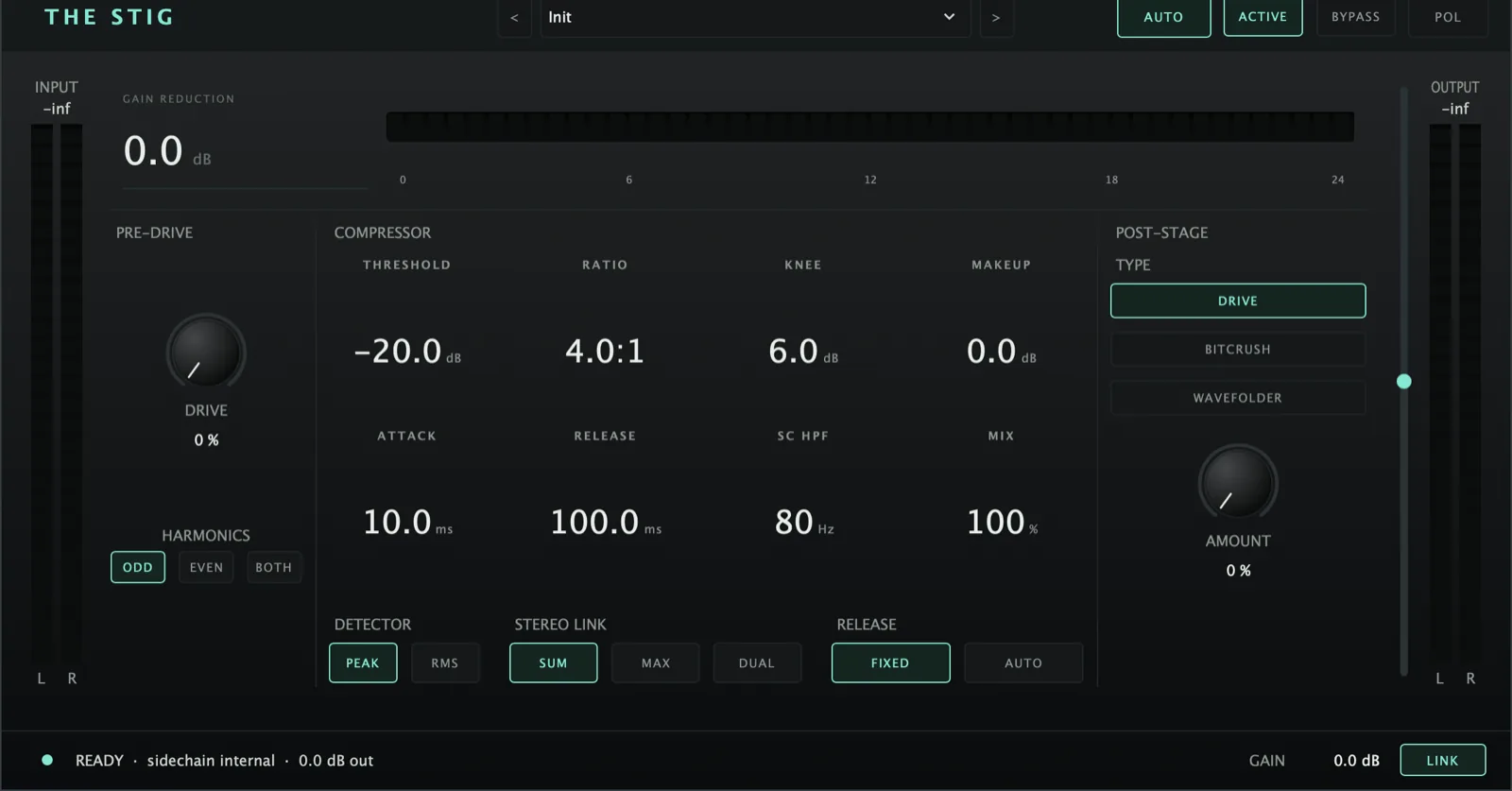
A compressor that saturates hard and distorts harder. The drive hits the detector, not just the tone - so it changes how it grabs, not only how it sounds.
AU · VST3 · Standalone - not Pro Tools (no AAX). Formats and requirements.
Price includes VAT. Nothing is added at checkout.
Every update included
One price, and it is yours for good: every future update to what you buy is included at no extra cost. There is no subscription and no upgrade fee.
A clean, modern VCA compressor with real character stages - not an emulation of one classic box. Transparent when you want it; but the *pre-drive saturates into the detector (so drive changes how the compressor grabs, not just the tone), and the post-stage adds Drive / Bitcrush / Wavefolder* after it - from subtle harmonic thickening to full destruction.
demo
See it work.
what's in it
Every control, and what it's for.
Controls marked Brain are the ones the Analyser can set for you on an ANALYSE pass.
Compressor core
Where compression starts. Lower = more. Watch the GR meter.
How hard, 1:1 (off) to 20:1 (limiting).
0 dB (hard, punchy) to 24 dB (soft, gentle).
0.1–100 ms. Slow lets transients through (keeps beater/pluck); fast grabs everything.
Caps how fast the level may come back up, in dB per second (Off at the top). Release alone recovers fastest right after a deep duck; Rise turns the recovery into a steady fade-up - made for a sidechained orchestra or pad swelling back under a vocal.
0–20 ms. Delays the audio while the detector hears it (or the sidechain key) straight away, so the compression is already moving when the sound arrives. Adds that much latency, which the DAW compensates. 0 ms = off, no latency.
10–1000 ms, with optional Auto Release that adapts to the material (good on vocals and bus).
Adds back the level lost to compression.
Sidechain high-pass 20–500 Hz - stops low end driving the detector. Essential on bass and full mixes so they don’t pump on every low note.
What the compressor listens to: Int is the track; Ext is the external sidechain input chosen in your DAW (duck a bass from the kick, a pad from the vocal). SC HPF still applies. The key track is picked in the DAW’s sidechain menu.
Peak (follows transients - drums, percussion) or RMS (averages level - vocals and bus, so it rides the body of the sound, not the spikes).
Sum L+R / Max L+R / Dual Mono - how the two channels are detected. Keep stereo sources linked so the image doesn’t wander.
The Stig Compressor
£29 - every future update included, no subscription.
Character
Saturation into the compressor so drive and detection interact. Harmonics switch: Odd (symmetric tanh, aggressive), Even (asymmetric bias, warm tube-style, DC-blocked), Both (blend). Bias scales with drive, so all three are identical at zero drive.
Colour after the compressor: Drive (harmonic warmth→grit), Bitcrush (bit-depth + sample-rate reduction, lo-fi/digital), Wavefolder (fold distortion with symmetry, synth-like, extreme).
How much of the post-stage.
OFF / 2X / 4X / 8X, in the switch strip. Runs Pre-Drive and the Drive post-stage at that many times the session rate, so a hard drive on bright material (cymbals, an “s”, the top of a guitar) stays clean instead of picking up harsh, out-of-tune grit. New instances open at 4X; a session saved before this switch existed opens at OFF, exactly as it sounded. Adds up to 32 samples of latency at 2X, 4X or 8X alike (the DAW compensates), and none at OFF. With both drives at 0 it changes nothing but that delay. Full Drive on very bright, loud material still keeps a little grit at 4X; 8X takes most of it out.
Output & suite integration
Wet/dry blend. 100% = straight compressor; pull back for parallel compression (smash hard, blend under the dry) with no second bus.
Signal invert and active/bypass.
Defaults OFF. There is deliberately no auto-apply the moment the DAW names a track - that fired before any audio had played, so it could only ever apply the same safe default. Settings arrive from the master Analyser’s ANALYSE pass, which lands on every Stig regardless of this toggle; turning AUTO on catches a track that was not playing during that window, and applies the compressor the brain computed for this track by name. Brain-controlled set, nine parameters: threshold, ratio, knee, attack, release, makeup, SC HPF, pre-drive amount and post-drive amount - the drive amounts are non-zero on the types that want character (kick, snare, toms, bass, electric guitar, rooms, drum bus) and zero on overheads, keys, vocals, BVs and the master bus. The Harmonics switch, the post-stage type, Mix, Stereo Link, Detector and Output are always yours. The first knob you touch turns AUTO off.
Output gain is the fader beside the OUT meter; the OUTPUT number under the meters sets the same thing. LINK (on by default) matches output to input by writing the Output fader half a second after you stop turning a dial, so drive and makeup change character, not loudness.
One face. Pre-Drive, Compressor (settings as draggable numbers in small screens), Post-Stage, then a meter bridge: IN, GR (hangs from the top), OUT, the Output fader and LINK. A strip of switches below. A selected button lights up white; the light beside THE STIG goes dark on bypass. The earlier modern face and the silver CLASSIC faceplate are gone.
Categories Drums, Bass, Guitars, Keys, Vocals, Bus, Mastering, Character, browsable as sub-menus, steppable with < >. Remembered by name with the session.
quick start
Four steps to a sound.
- Put it after Analyser in the chain.
- In the suite, run ANALYSE on the master Analyser to have a setting computed for this track - or load a preset by hand. AUTO is off by default.
- Set Threshold for the gain reduction you want (watch the GR meter), then taste with Ratio, Attack, Release.
- Bring level back with Makeup, or pull Mix back for parallel compression.
Not currently suitable for Pro Tools
These are AU and VST3 plugins. Pro Tools only loads AAX, which these aren't built as - so none of the suite will appear in it. Please check your DAW before you buy - once you download, the sale is final.
Get The Stig Compressor
AU · VST3 · Standalone - macOS 10.15 Catalina or later, Windows (VST3). Installers are not yet notarised, so there's one extra click on first install; the install guide walks through it.
Try the free demo of The Stig Compressor first. Every control works; the demo just drops to silence for 2 seconds in every 30. Buy it and paste in the code you're sent, and the dropouts stop - no reinstall.
Where it's confirmed to work
Honest version: this is a one-person operation, so it has been properly tested in the DAWs below and not yet in the others. Not tested yet means exactly that - not that it fails.
| DAW | System | Plugins load | They share with each other |
|---|---|---|---|
| Logic Pro | macOS | Yes | Yes |
| GarageBand The Two Knobs plugins are confirmed in GarageBand. This one has not been tested there yet. | macOS | Not tested yet | Not tested yet |
| Ableton Live Confirmed loading on both macOS and Windows. The sharing side is still to be checked. | Mac/Win | Yes | Not tested yet |
| Cubase / Nuendo Confirmed loading on both macOS and Windows. The sharing side is still to be checked. | Mac/Win | Yes | Not tested yet |
| Studio One Confirmed on Windows (VST3). The sharing side is still to be checked. | Mac/Win | Yes | Not tested yet |
| Reaper Confirmed on Intel Mac - both AU and VST3, and the plugins share with each other. Not yet tested on Windows. | Mac/Win | Yes | Yes |
| FL Studio | Mac/Win | Not tested yet | Not tested yet |
| Bitwig Studio Confirmed loading on both macOS and Windows. Bitwig keeps plugins apart from each other by default, so the sharing side needs checking separately. | Mac/Win | Yes | Not tested yet |
| Digital Performer | Mac/Win | Not tested yet | Not tested yet |
| Pro Tools Pro Tools only loads AAX plugins. These are AU and VST3. | Mac/Win | No | No |
| System | Confirmed | |
|---|---|---|
| macOS on Intel | Yes | Confirmed working from 10.15 Catalina upwards. |
| macOS on Apple Silicon | Yes | Confirmed on an M4 Mac in Logic Pro. The installers are universal binaries, so they run natively - no Rosetta needed. |
| Windows 10 / 11 | Yes | VST3 only - there is no AU on Windows. Confirmed in Studio One, Ableton Live, Cubase and Bitwig. |
"They share with each other" is the ANALYSE pass, the clash matrix and the AUTO settings. Where a DAW keeps plugins apart, every plugin still works perfectly on its own - they just can't pass measurements between them, and nothing breaks. Ten-second check in any DAW: put Analyser on two tracks, turn one to master, and see whether the second track appears in its overview. Tell me what you find and this list gets updated.