

The Levels suite
DI Regan
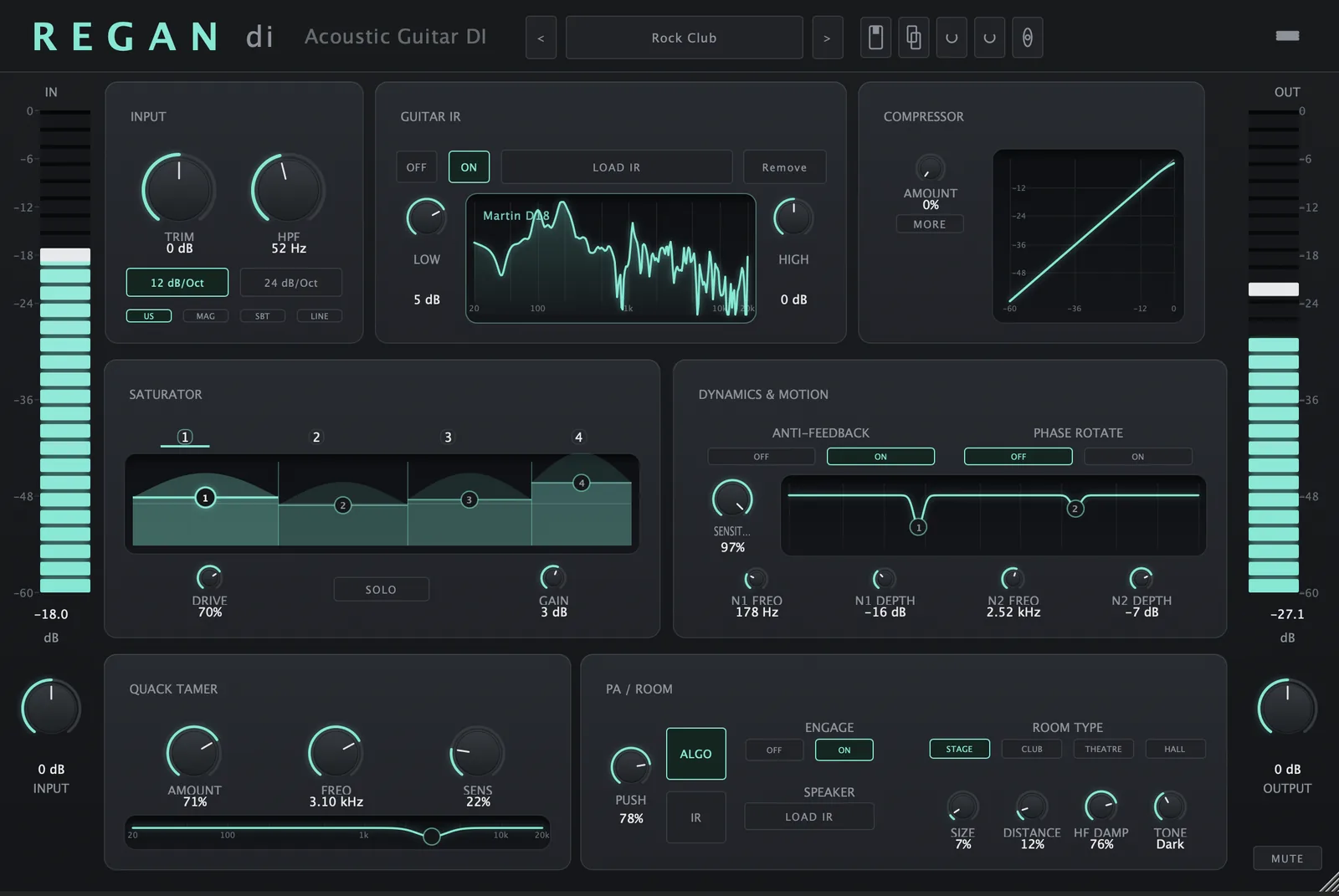
At last, a cheap DI'd acoustic can sound like an expensive mic'd classic. Built for that one job - and its 4-band saturator shapes snares and kicks beautifully too.
AU · VST3 · Standalone - not Pro Tools (no AAX). Formats and requirements.
Price includes VAT. Nothing is added at checkout.
Every update included
One price, and it is yours for good: every future update to what you buy is included at no extra cost. There is no subscription and no upgrade fee.
A mono acoustic-DI channel strip: it turns a thin, quacky acoustic DI (piezo / magnetic / SBT) into a mic’d acoustic through a PA in a room. A full series chain - Input → Quack Tamer → Guitar IR → 4-band Saturator → Compressor → Anti-Feedback → PA/Room → Output. Part of the suite but completely standalone (no brain, no shared state).
what's in it
Every control, and what it's for.
Input & Quack Tamer
Input gain (−24…+24 dB), phase invert, and a high-pass with a 12 / 24 dB/oct slope switch.
US / MAG / SBT / LINE - voices the strip for your source and sets the Quack Tamer defaults; filters the guitar-IR browser (does not hard-gate loading).
A dynamic dip over the piezo “quack” region - ducks on transients, leaves sustained tone alone (not a static notch). Amount / Freq (1.5–4 kHz) / Sens.
Guitar IR & Saturator
Zero-latency convolution - the body/mic core. ON, the IR picker (embedded factory IRs or Load from file…), Remove, and Low / High trims for the IR extremes.
Linkwitz-Riley crossovers into one shared, oversampled saturation curve. Three moveable crossovers = four bands; per band Drive (loudness-compensated - pushing changes tone, not level), Gain, Solo (for dialling).
DI Regan
£29 - every future update included, no subscription.
Compressor & Anti-Feedback
Gentle, program-dependent, acoustic-voiced glue. Amount macro (auto makeup) with Ratio / Attack / Release / Makeup always on show for detail; a live transfer-curve graph.
Catches resonant peaks (including ones the IR itself creates) before the room adds reflections. OFF/ON + Sensitivity (a bank of auto-hunting notches) and Phase Rotate for extra gain-before-feedback.
PA / Room & Output
The final “arriving in a space through a PA” voicing. Engage (section master), Speaker ALGO vs IR, Room Type Stage/Club/Theatre/Hall (algorithmic), Push (LF-weighted saturation + level-dependent compression - the “moving air” no IR reproduces), and Size / Distance / HF Damp / Pre-Delay / Tone (Pre-Delay: 0-40 ms before the room’s reflections arrive). Distance also sets wetness (further = wetter) - there is no separate room-mix knob.
Trim (output level) and Mute. Mono in → mono out throughout; zero added latency except the saturator oversampling (reported to the host).
quick start
Four steps to a sound.
- Insert on a mono acoustic DI track; set the Pickup type (US / MAG / SBT / LINE).
- Clean the input: HPF + Trim, then load or pick a Guitar IR (the body/mic core).
- Dial the 4-Band Saturator and Compressor to taste (it’s a full series strip - no dry/wet blend).
- Optional: engage PA / Room for the “amplified in a space” voicing; add Push for moving air.
Not currently suitable for Pro Tools
These are AU and VST3 plugins. Pro Tools only loads AAX, which these aren't built as - so none of the suite will appear in it. Please check your DAW before you buy - once you download, the sale is final.
Get DI Regan
AU · VST3 · Standalone - macOS 10.15 Catalina or later, Windows (VST3). Installers are not yet notarised, so there's one extra click on first install; the install guide walks through it.
Try the free demo of DI Regan first. Every control works; the demo just drops to silence for 2 seconds in every 30. Buy it and paste in the code you're sent, and the dropouts stop - no reinstall.
Where it's confirmed to work
Honest version: this is a one-person operation, so it has been properly tested in the DAWs below and not yet in the others. Not tested yet means exactly that - not that it fails.
| DAW | System | Plugins load | They share with each other |
|---|---|---|---|
| Logic Pro | macOS | Yes | Yes |
| GarageBand The Two Knobs plugins are confirmed in GarageBand. This one has not been tested there yet. | macOS | Not tested yet | Not tested yet |
| Ableton Live Confirmed loading on both macOS and Windows. The sharing side is still to be checked. | Mac/Win | Yes | Not tested yet |
| Cubase / Nuendo Confirmed loading on both macOS and Windows. The sharing side is still to be checked. | Mac/Win | Yes | Not tested yet |
| Studio One Confirmed on Windows (VST3). The sharing side is still to be checked. | Mac/Win | Yes | Not tested yet |
| Reaper Confirmed on Intel Mac - both AU and VST3, and the plugins share with each other. Not yet tested on Windows. | Mac/Win | Yes | Yes |
| FL Studio | Mac/Win | Not tested yet | Not tested yet |
| Bitwig Studio Confirmed loading on both macOS and Windows. Bitwig keeps plugins apart from each other by default, so the sharing side needs checking separately. | Mac/Win | Yes | Not tested yet |
| Digital Performer | Mac/Win | Not tested yet | Not tested yet |
| Pro Tools Pro Tools only loads AAX plugins. These are AU and VST3. | Mac/Win | No | No |
| System | Confirmed | |
|---|---|---|
| macOS on Intel | Yes | Confirmed working from 10.15 Catalina upwards. |
| macOS on Apple Silicon | Yes | Confirmed on an M4 Mac in Logic Pro. The installers are universal binaries, so they run natively - no Rosetta needed. |
| Windows 10 / 11 | Yes | VST3 only - there is no AU on Windows. Confirmed in Studio One, Ableton Live, Cubase and Bitwig. |
"They share with each other" is the ANALYSE pass, the clash matrix and the AUTO settings. Where a DAW keeps plugins apart, every plugin still works perfectly on its own - they just can't pass measurements between them, and nothing breaks. Ten-second check in any DAW: put Analyser on two tracks, turn one to master, and see whether the second track appears in its overview. Tell me what you find and this list gets updated.