

The Levels suite
Analyser
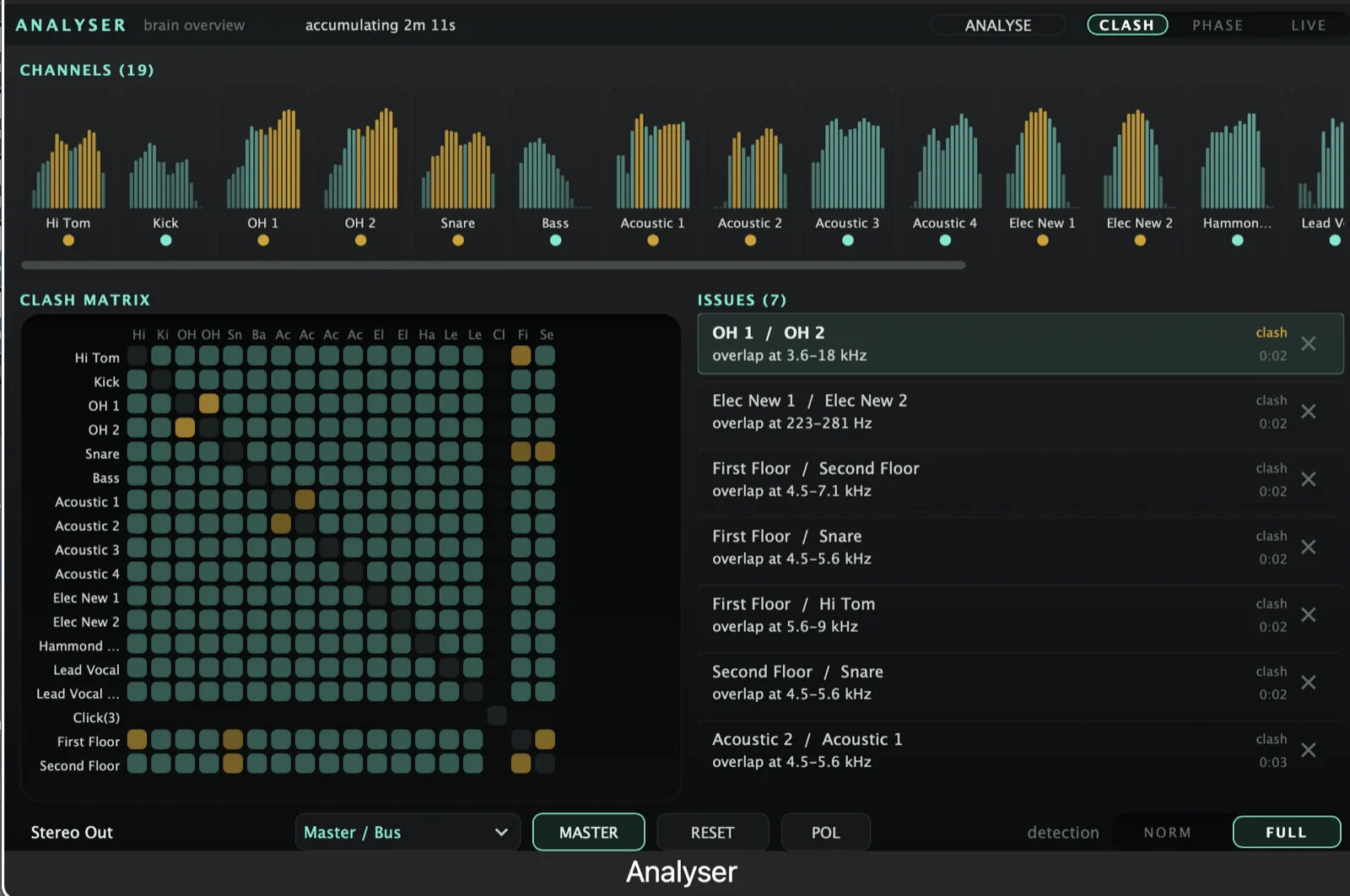
Builds a phase- and frequency-clash matrix of your entire mix, then tells every EQ how to fix it. Sets levels across the whole session in ten seconds. Live mode for setting up studio mics while you move them.
AU · VST3 · Standalone - not Pro Tools (no AAX). Formats and requirements.
Price includes VAT. Nothing is added at checkout.
Every update included
One price, and it is yours for good: every future update to what you buy is included at no extra cost. There is no subscription and no upgrade fee.
An FFT mix analyser that doesn’t just show you problems - it fixes them. It sits first in every track’s chain, gain-stages the raw signal, and builds one live picture of how the whole mix fits together (where tracks mask each other, where they cancel in phase). Then, on a single ANALYSE pass, it computes and pushes bespoke settings to every Stig, Denzel, Zuul and Tyson in the session. The coordinating hub the rest of the suite reads from.
what's in it
Every control, and what it's for.
Controls marked Brain are the ones the Analyser can set for you on an ANALYSE pass.
Modes & display
Analyser is two tools in one, switched by the master toggle.
Switches between channel-strip mode (compact per-track meter + spectrum) and master / brain-overview mode (the whole-mix dashboard). Promote exactly one instance to master.
Strip layout offers Levels / Clash / Phase. Master layout’s matrix offers Clash / Phase / Live. A session saved on Live and reopened on a strip clamps back to Phase.
A rolling short-window phase read for mic-placement work - rebuilt from the last N frames every refresh, immune to RESET by design. Numbers move within seconds as a mic is nudged. Hold-time preset selector offers 5s / 10s / 20s (each paired with a matching rolling window).
Track type & gain-staging
The one place gain-staging lives in the suite.
Reads the DAW track name and classifies it (Kick, Snare, Bass, Vocal, Guitar, Keys…). This drives the whole suite’s defaults. Override manually from the type dropdown.
Brings raw input to a per-type body target (Vocal −11 dBFS, Drums −21, Electric Guitar −18, Master bus a fixed −6) on the audio thread with a 20 ms ramp, so downstream EQ / compression always see a consistent level.
Analyser
£29 - every future update included, no subscription.
Clash, phase & audition
Cross-track masking and cancellation, accumulated over time - not a single-frame snapshot.
Accumulates instantaneous spectral masking between every pair of tracks and reports where they fight, by frequency range and severity - “when you both play, how badly do you collide”.
Per-band correlation against a nominated reference track; flags destructive cancellation.
Solos just the flagged frequency band of a finding across the two tracks involved; every other track is silenced. Ends into a −20 dB safety dim.
Norm/Focused (only findings with real weight - default) or Full/Thorough (also borderline issues, dimmed). Persisted by value: sessions saved before the 2026-07-24 reorder reopen in the opposite mode (accepted).
Every finding with ignore / reset, persisted per session.
Coordination & output
The primary setup path. Runs a timed measurement pass over the playing session, then computes and pushes custom EQ + compressor + gate + de-ess settings to every Stig / Denzel / Zuul / Tyson that accumulated audio.
Per-instance polarity invert.
quick start
Four steps to a sound.
- Insert Analyser first on every track you want the suite to coordinate - before any EQ or compressor.
- Leave track-type on auto (it reads the DAW track name) or set it by hand from the dropdown.
- Leave the gain button on - it brings the raw input to a sensible working level for everything downstream.
- Promote one instance to master to get the whole-mix overview, then use ANALYSE to set up every Stig / Denzel / Zuul / Tyson at once.
Not currently suitable for Pro Tools
These are AU and VST3 plugins. Pro Tools only loads AAX, which these aren't built as - so none of the suite will appear in it. Please check your DAW before you buy - once you download, the sale is final.
Get Analyser
AU · VST3 · Standalone - macOS 10.15 Catalina or later, Windows (VST3). Installers are not yet notarised, so there's one extra click on first install; the install guide walks through it.
Try the free demo of Analyser first. Every control works; the demo just drops to silence for 2 seconds in every 30. Buy it and paste in the code you're sent, and the dropouts stop - no reinstall.
Where it's confirmed to work
Honest version: this is a one-person operation, so it has been properly tested in the DAWs below and not yet in the others. Not tested yet means exactly that - not that it fails.
| DAW | System | Plugins load | They share with each other |
|---|---|---|---|
| Logic Pro | macOS | Yes | Yes |
| GarageBand The Two Knobs plugins are confirmed in GarageBand. This one has not been tested there yet. | macOS | Not tested yet | Not tested yet |
| Ableton Live Confirmed loading on both macOS and Windows. The sharing side is still to be checked. | Mac/Win | Yes | Not tested yet |
| Cubase / Nuendo Confirmed loading on both macOS and Windows. The sharing side is still to be checked. | Mac/Win | Yes | Not tested yet |
| Studio One Confirmed on Windows (VST3). The sharing side is still to be checked. | Mac/Win | Yes | Not tested yet |
| Reaper Confirmed on Intel Mac - both AU and VST3, and the plugins share with each other. Not yet tested on Windows. | Mac/Win | Yes | Yes |
| FL Studio | Mac/Win | Not tested yet | Not tested yet |
| Bitwig Studio Confirmed loading on both macOS and Windows. Bitwig keeps plugins apart from each other by default, so the sharing side needs checking separately. | Mac/Win | Yes | Not tested yet |
| Digital Performer | Mac/Win | Not tested yet | Not tested yet |
| Pro Tools Pro Tools only loads AAX plugins. These are AU and VST3. | Mac/Win | No | No |
| System | Confirmed | |
|---|---|---|
| macOS on Intel | Yes | Confirmed working from 10.15 Catalina upwards. |
| macOS on Apple Silicon | Yes | Confirmed on an M4 Mac in Logic Pro. The installers are universal binaries, so they run natively - no Rosetta needed. |
| Windows 10 / 11 | Yes | VST3 only - there is no AU on Windows. Confirmed in Studio One, Ableton Live, Cubase and Bitwig. |
"They share with each other" is the ANALYSE pass, the clash matrix and the AUTO settings. Where a DAW keeps plugins apart, every plugin still works perfectly on its own - they just can't pass measurements between them, and nothing breaks. Ten-second check in any DAW: put Analyser on two tracks, turn one to master, and see whether the second track appears in its overview. Tell me what you find and this list gets updated.