

The Levels suite
Tyson De-Esser
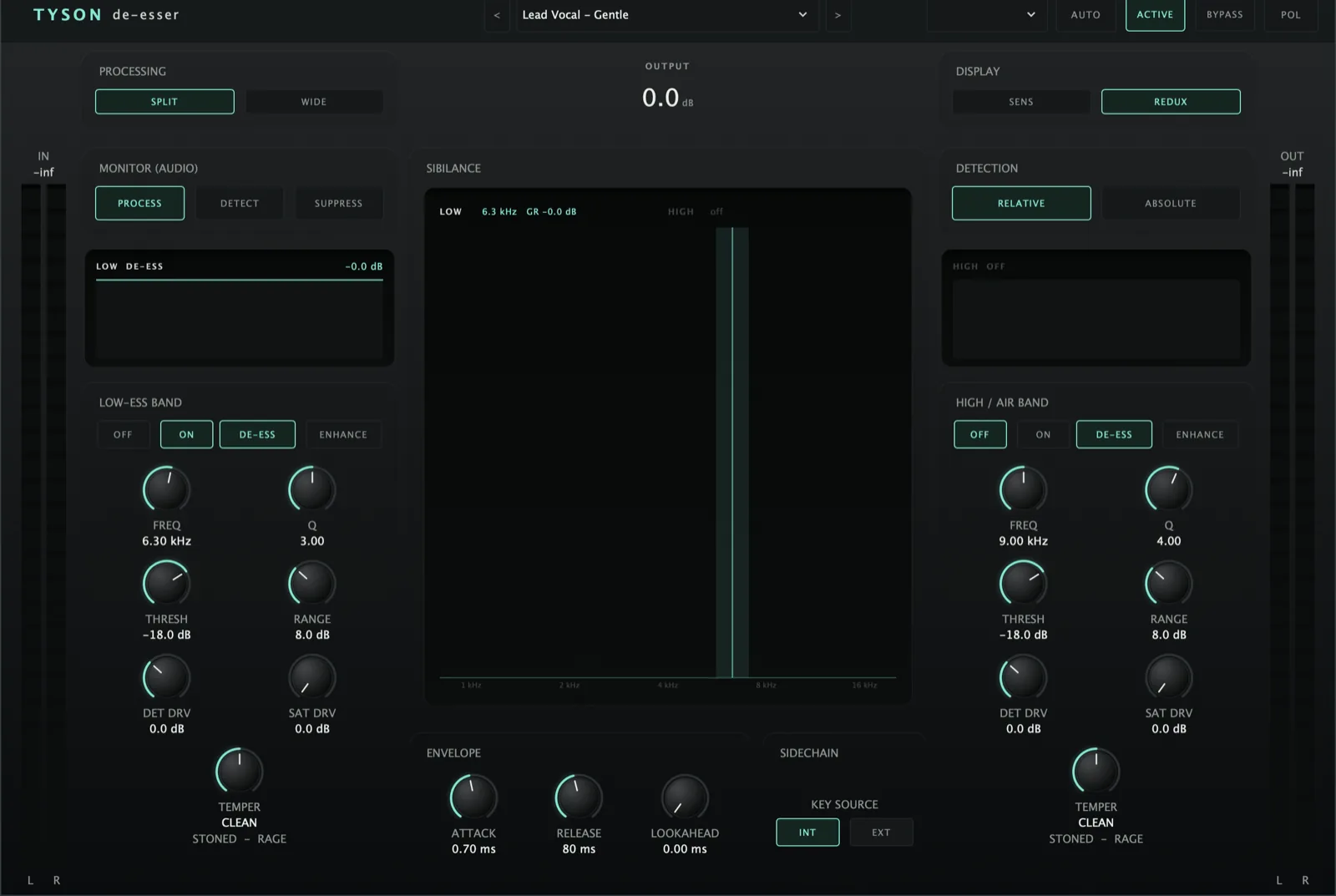
De-esses without the lisp, and runs backwards too - putting an ess back when a vocal has gone soft. Saturation from smooth to savage.
AU · VST3 · Standalone - not Pro Tools (no AAX). Formats and requirements.
Price includes VAT. Nothing is added at checkout.
Tyson Group is included
Buying Tyson De-Esser also gets you Tyson Group at no extra cost - the bus plugin that governs a whole stack of Tyson De-Esser instances so a doubled vocal group is levelled together instead of track by track. Stacked vocals de-essed as one. Twelve BVs stop compounding into a lisp, because the group sets the budget instead of every track guessing alone. It is not sold separately: it coordinates Tyson De-Esser instances and does nothing on its own.
Every update included
One price, and it is yours for good: every future update to what you buy is included at no extra cost. There is no subscription and no upgrade fee.
A dual-band de-esser / ess-restorer built on a subtractive split-band engine - at rest y = x exactly, so there’s no phase smear on non-sibilant material. Each band can De-ess (remove) or Enhance (restore) sibilance, with a Temper control (STONED ↔ CLEAN ↔ RAGE) that lifts and colours each band. A brain consumer, and the satellite side of Tyson Group.
what's in it
Every control, and what it's for.
Controls marked Brain are the ones the Analyser can set for you on an ANALYSE pass.
Per band (Low-ess / High-Air)
Two independent sibilance bands. The subtractive engine isolates each with a constant-0 dB band-pass and subtracts a fraction back, so the removed signal is exactly x − y.
De-ess (downward, remove) or Enhance (upward, restore). Enhance is a genuine reverse de-esser: the relative detector fires on an “sss” regardless of loudness, so a weak/lispy ess can be lifted back in.
Threshold (relative or absolute) and Range = max action for that band.
Colours the band. CLEAN (centre) leaves it untouched; STONED or RAGE lift it and add a little distortion, RAGE more than STONED. It adds rather than removes, so it keeps presence while de-essing and puts more back when enhancing.
Det Drive gains into the detector (set sensitivity by drive, not threshold). Sat Drive turns Temper up: a bigger lift on the band, up to about 10 dB at full. It does nothing while Temper is at CLEAN.
Tyson De-Esser
£29 - every future update included, no subscription.
Detector, monitor & display
Relative compares band level to broadband, so it fires on sibilance not loud vowels (the “doesn’t lisp on sustained notes” default). Absolute thresholds the band directly. Gated below −70 dB so silence shows no phantom reduction.
Split subtracts the band (default, phase-correct). Wideband ducks the whole signal by the combined band gain (classic wideband grab). Soften/character apply to the split path only.
Routes what you hear: Process / Detector (the band key) / Suppressor (the removed sibilance - the “am I lisping?” check). Falls out of the same maths, no separate audition DSP.
Scope overlay over a live spectrum with each band’s coverage stripe: Sensitivity (detector level vs threshold, lit bright when triggering) or Reduction (De-ess bar hangs from top, Enhance bar grows from bottom in cyan). Each band also has its own scrolling activity strip.
Lookahead knob (0 ms = off, no separate toggle) delays the through-signal so a fast ess is caught. Key Source Internal/External sidechain.
Brain & stack coordination
Reads a bespoke de-ess by track name (getComputedDeEssByName). Measurement-driven: finds each voice’s sibilant peaks where the HF pokes above its own local envelope - two singers at 6 kHz vs 8 kHz get different bands - and sets centre/Q/threshold/range/envelope from how far it pokes and how much of the mix already carries that region. Returns nothing for non-sibilant sources (kick, bass…).
Type a GROUP name and this Tyson joins that vocal stack, telling the others what it's hearing. Tyson Group hands it back a share of the total reduction, eased in smoothly so nothing jumps. It only kicks in once there are two or more members, or a Tyson Group on the bus - a lone de-esser that happens to share a name is left completely alone. This runs alongside the Analyser's AUTO rather than instead of it; use both at once.
quick start
Four steps to a sound.
- Insert on the voice; set each band’s Freq / Q over its sibilance (Low-ess ~4–8 kHz, High/Air ~7–16 kHz).
- Leave Detection on Relative so it triggers on sibilance, not loud vowels.
- Set Threshold and Range per band; use Monitor → Suppressor to hear exactly what’s being removed.
- Optional: switch a band to Enhance to restore a weak ess, and dial Temper for character.
Not currently suitable for Pro Tools
These are AU and VST3 plugins. Pro Tools only loads AAX, which these aren't built as - so none of the suite will appear in it. Please check your DAW before you buy - once you download, the sale is final.
Get Tyson De-Esser
AU · VST3 · Standalone - macOS 10.15 Catalina or later, Windows (VST3). Installers are not yet notarised, so there's one extra click on first install; the install guide walks through it.
Try the free demo of Tyson De-Esser first. Every control works; the demo just drops to silence for 2 seconds in every 30. Buy it and paste in the code you're sent, and the dropouts stop - no reinstall.
Where it's confirmed to work
Honest version: this is a one-person operation, so it has been properly tested in the DAWs below and not yet in the others. Not tested yet means exactly that - not that it fails.
| DAW | System | Plugins load | They share with each other |
|---|---|---|---|
| Logic Pro | macOS | Yes | Yes |
| GarageBand The Two Knobs plugins are confirmed in GarageBand. This one has not been tested there yet. | macOS | Not tested yet | Not tested yet |
| Ableton Live Confirmed loading on both macOS and Windows. The sharing side is still to be checked. | Mac/Win | Yes | Not tested yet |
| Cubase / Nuendo Confirmed loading on both macOS and Windows. The sharing side is still to be checked. | Mac/Win | Yes | Not tested yet |
| Studio One Confirmed on Windows (VST3). The sharing side is still to be checked. | Mac/Win | Yes | Not tested yet |
| Reaper Confirmed on Intel Mac - both AU and VST3, and the plugins share with each other. Not yet tested on Windows. | Mac/Win | Yes | Yes |
| FL Studio | Mac/Win | Not tested yet | Not tested yet |
| Bitwig Studio Confirmed loading on both macOS and Windows. Bitwig keeps plugins apart from each other by default, so the sharing side needs checking separately. | Mac/Win | Yes | Not tested yet |
| Digital Performer | Mac/Win | Not tested yet | Not tested yet |
| Pro Tools Pro Tools only loads AAX plugins. These are AU and VST3. | Mac/Win | No | No |
| System | Confirmed | |
|---|---|---|
| macOS on Intel | Yes | Confirmed working from 10.15 Catalina upwards. |
| macOS on Apple Silicon | Yes | Confirmed on an M4 Mac in Logic Pro. The installers are universal binaries, so they run natively - no Rosetta needed. |
| Windows 10 / 11 | Yes | VST3 only - there is no AU on Windows. Confirmed in Studio One, Ableton Live, Cubase and Bitwig. |
"They share with each other" is the ANALYSE pass, the clash matrix and the AUTO settings. Where a DAW keeps plugins apart, every plugin still works perfectly on its own - they just can't pass measurements between them, and nothing breaks. Ten-second check in any DAW: put Analyser on two tracks, turn one to master, and see whether the second track appears in its overview. Tell me what you find and this list gets updated.