

The Levels suite
Wallace Reverb
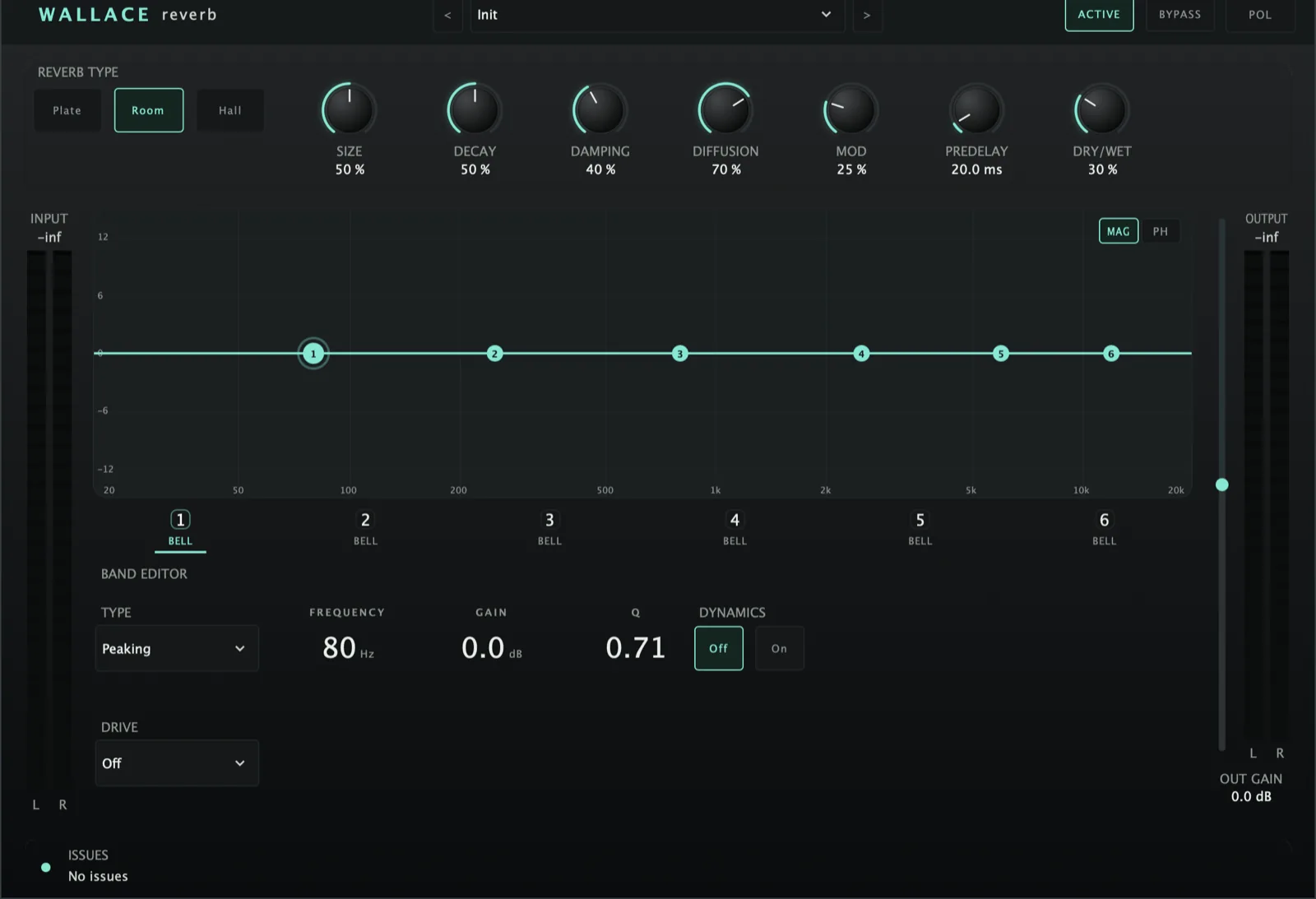
A reverb you design the faults into. Denzel's whole EQ and distortion engine on the wet - six bands, any one of them gritting up before the rest. The drive hits the sound on its way into the reverb, so the space softens it the way it would a real source. And it only ever touches the wet: the dry sits exactly where it was.
AU · VST3 · Standalone - not Pro Tools (no AAX). Formats and requirements.
Price includes VAT. Nothing is added at checkout.
Every update included
One price, and it is yours for good: every future update to what you buy is included at no extra cost. There is no subscription and no upgrade fee.
The whole engine, on the wet
Six bands of dynamic EQ with per-band distortion, running on the wet only. Dirty the reverb as hard as you like and the source is untouched - and each band can key its dynamics off an external sidechain, so the tail ducks out of the way of the dry and comes back in after it.
Saturation, per band
Choose which frequencies break up and which stay clean. The band's own curve decides the shape of whatever gets driven, and 0% is perfectly clean - only the harmonic residue is summed back.
Character, not volume
Turn a band's drive up and it changes how that band sounds, not how loud it is. Each shaper works against the band's own level, so a fading tail keeps the same grain all the way down instead of jumping up.
Past what could be built
Wavefolder folds a band back on itself; Bitcrush steps it down to half a bit. Aimed at one frequency region with the rest left clean, and oversampled so the harmonics do not alias back down.
A reverb built on a custom 8-line feedback delay network (Plate / Room / Hall), feeding Denzel’s dynamic-EQ + multiband-distortion engine applied to the wet signal only, with a per-band external sidechain. Brain-free in v1.
demo
See it work.
what's in it
Every control, and what it's for.
Reverb core
Plate / Room / Hall - FDN tunings (base delay scaling, Decay→RT60 range, tonal damping bias).
The reverb time, 100 ms – 20 s, read in ms (e.g. 1500 ms). Changing Type keeps the time. A session saved before 1.9.3 runs the old engine and shows the old Decay % knob instead, sounding exactly as it did.
Scales the delay-line lengths (space / density).
How much faster highs decay than lows.
Input-diffuser allpass amount (smooths the onset).
Per-line delay LFO depth - breaks up metallic ringing on sustained / tonal input.
0–250 ms delay line in front of the FDN.
The final mix (last reverb knob). out = dry·(1−mix) + wet·mix, then output gain + polarity. A new Wallace and every factory preset start at 100% (fully wet, for a send); saved sessions keep their own mix.
Wallace Reverb
£29 - every future update included, no subscription.
Wet processing (Denzel engine)
The EQ + distortion shape the wet only; the dry path is untouched.
The curve has two views. MAG is the familiar magnitude response. PHASE swaps in a −180°..+180° grid on the same log-frequency axis and draws the wet EQ’s own summed phase response, including the low cut - drawn from the exact same coefficients as the audio, so what you see cannot drift from what you hear. Useful for seeing what a steep cut or a high-Q bell is doing to the tail’s phase.
Static + upward/downward dynamic EQ on the wet tail (identical to Denzel’s engine).
Per-band drive shapers Saturate / Drive / Bitcrush / Wavefolder, oversampled where needed. Since 1.9.3 the drive works on the sound going into the reverb, so the reverb’s damping softens what it adds (no fizz on the tail), and raising a band’s drive changes its character, not its level. Bitcrush runs from about 5 bits down to half a bit, so it is clearly audible from the middle of the knob.
Each dynamic band can key detection off an external sidechain input instead of its own energy. Standard use: duck the reverb tail from the dry source. Falls back to internal detection when nothing is routed.
A high-pass on the wet signal only, 0–500 Hz (fully left = Off), on the meter bridge. The knob is spaced by ear: a quarter of the way ≈ 45 Hz, half ≈ 150 Hz, three quarters ≈ 300 Hz.
quick start
Four steps to a sound.
- Insert on a send/aux (or an insert with Wet/Dry pulled back).
- Pick a type (Plate / Room / Hall), set Decay (RT60) and Predelay.
- Shape the tail with Size, Damping, Diffusion, Modulation.
- Optionally EQ / drive the wet with the six dynamic bands - e.g. duck the tail from the dry source via a band’s SC toggle.
Not currently suitable for Pro Tools
These are AU and VST3 plugins. Pro Tools only loads AAX, which these aren't built as - so none of the suite will appear in it. Please check your DAW before you buy - once you download, the sale is final.
Get Wallace Reverb
AU · VST3 · Standalone - macOS 10.15 Catalina or later, Windows (VST3). Installers are not yet notarised, so there's one extra click on first install; the install guide walks through it.
Try the free demo of Wallace Reverb first. Every control works; the demo just drops to silence for 2 seconds in every 30. Buy it and paste in the code you're sent, and the dropouts stop - no reinstall.
Where it's confirmed to work
Honest version: this is a one-person operation, so it has been properly tested in the DAWs below and not yet in the others. Not tested yet means exactly that - not that it fails.
| DAW | System | Plugins load | They share with each other |
|---|---|---|---|
| Logic Pro | macOS | Yes | Yes |
| GarageBand The Two Knobs plugins are confirmed in GarageBand. This one has not been tested there yet. | macOS | Not tested yet | Not tested yet |
| Ableton Live Confirmed loading on both macOS and Windows. The sharing side is still to be checked. | Mac/Win | Yes | Not tested yet |
| Cubase / Nuendo Confirmed loading on both macOS and Windows. The sharing side is still to be checked. | Mac/Win | Yes | Not tested yet |
| Studio One Confirmed on Windows (VST3). The sharing side is still to be checked. | Mac/Win | Yes | Not tested yet |
| Reaper Confirmed on Intel Mac - both AU and VST3, and the plugins share with each other. Not yet tested on Windows. | Mac/Win | Yes | Yes |
| FL Studio | Mac/Win | Not tested yet | Not tested yet |
| Bitwig Studio Confirmed loading on both macOS and Windows. Bitwig keeps plugins apart from each other by default, so the sharing side needs checking separately. | Mac/Win | Yes | Not tested yet |
| Digital Performer | Mac/Win | Not tested yet | Not tested yet |
| Pro Tools Pro Tools only loads AAX plugins. These are AU and VST3. | Mac/Win | No | No |
| System | Confirmed | |
|---|---|---|
| macOS on Intel | Yes | Confirmed working from 10.15 Catalina upwards. |
| macOS on Apple Silicon | Yes | Confirmed on an M4 Mac in Logic Pro. The installers are universal binaries, so they run natively - no Rosetta needed. |
| Windows 10 / 11 | Yes | VST3 only - there is no AU on Windows. Confirmed in Studio One, Ableton Live, Cubase and Bitwig. |
"They share with each other" is the ANALYSE pass, the clash matrix and the AUTO settings. Where a DAW keeps plugins apart, every plugin still works perfectly on its own - they just can't pass measurements between them, and nothing breaks. Ten-second check in any DAW: put Analyser on two tracks, turn one to master, and see whether the second track appears in its overview. Tell me what you find and this list gets updated.