

The Levels suite
Tyson Group
Stacked vocals de-essed as one. Twelve BVs stop compounding into a lisp, because the group sets the budget instead of every track guessing alone.
The bus-plugin coordinator for a stack of Tyson de-essers. Put it on the vocal aux, give it and every stacked Tyson the same GROUP name, and it budgets de-essing across the stack so a doubled/tripled BV group isn’t de-essed track-by-track into a lifeless, lispy composite.
Comes with Tyson De-Esser
Tyson Group isn't sold separately - it coordinates a group of Tyson De-Esser instances and does nothing on its own. Buy Tyson De-Esser and this comes with it, and it is in the complete package too.
demo
See it work.
Demo coming soon
what's in it
Every control, and what it's for.
Controls marked Brain are the ones the Analyser can set for you on an ANALYSE pass.
Grouping & budget
Name the stack here. Each stacked Tyson then selects this group from its dropdown - no free-typing on members. Load-order-independent (a Tyson can join before the coordinator exists).
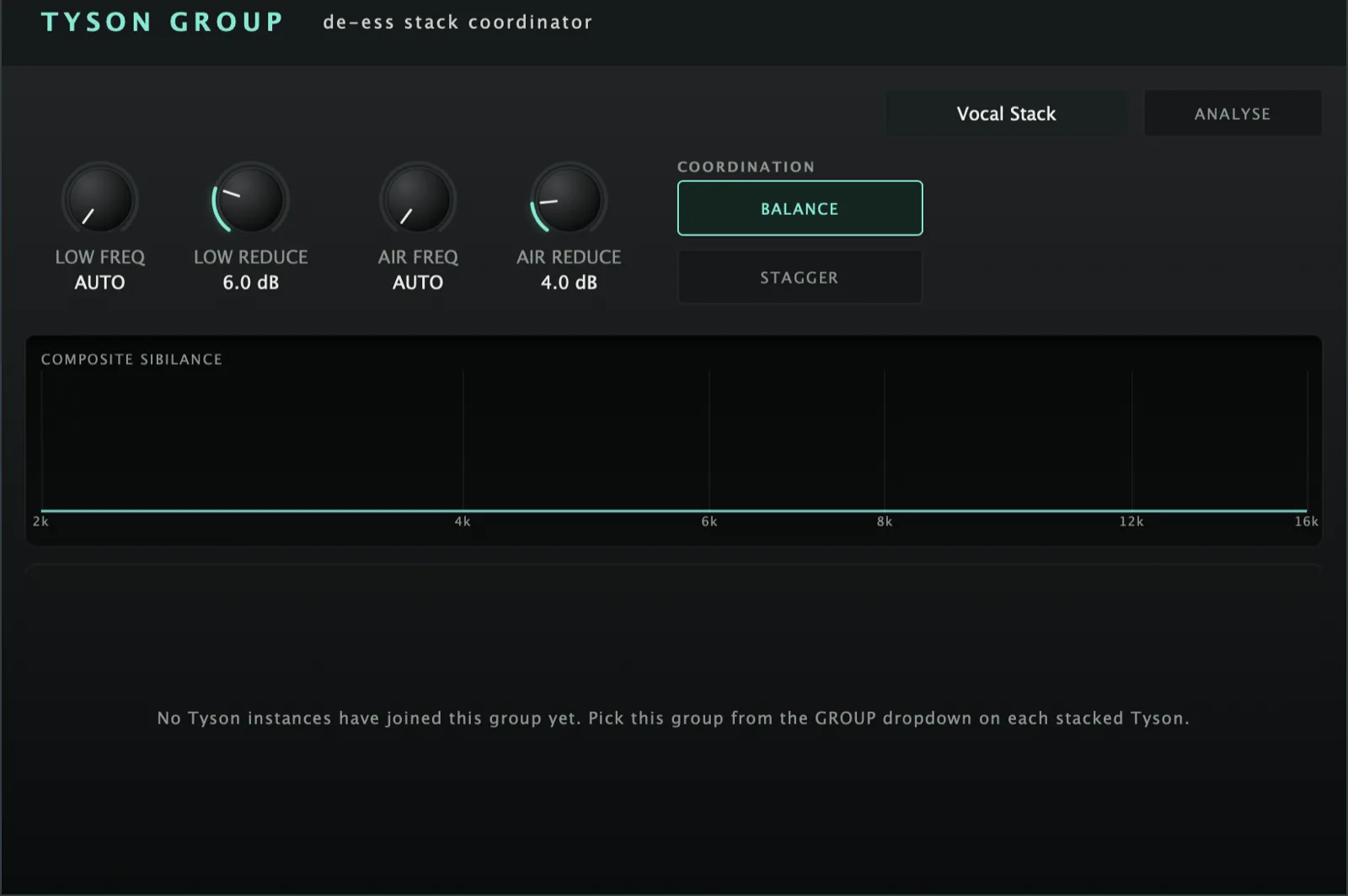
The composite reduction target per band - the budget R. The levelled target is T = maxSibilance − R; each member gives clamp(sibilance_i − T, 0, ceiling). Louder members give way more; members at/below T keep their ess.
Master band centre. 0 = AUTO (each member keeps its own ANALYSE-detected centre); above 0, pins every member to this centre.
BALANCE = the sibilance-levelling budget on/off (amount). STAGGER = spread members’ detector centres apart by slot (~±6%) to stop stacked sibilance fluttering/combing. Independent - both-on is normal.
Analysis & monitoring
Works like the Analyser's ANALYSE. Confirm, then play the stack for ten seconds while every member listens to where its own sibilance actually sits. At the end each Tyson gets its own band centres - tuned to that voice, not to a shared average - applied in one go. The ongoing levelling keeps riding on top.
One row per Tyson: name, per-band sibilance + how far the budget is pulling it back, and a SOLO box (audition that member; ending a solo engages the group DIM, shown as an UNDIM button).
The summed HF profiles of all members. As the budget levels the stack, the hump over the sibilant region flattens - the visual proof the coordinator is working.
quick start
Four steps to a sound.
- Insert Tyson Group on the vocal aux/bus; type a GROUP name in its field.
- On each stacked Tyson, pick that group from its GROUP dropdown (coordinator names, satellites select).
- Set the composite LOW / AIR REDUCE targets and (optionally) master FREQ (0 = AUTO per member).
- Run ANALYSE to give each member bespoke band centres, then watch the composite meter flatten.
Not currently suitable for Pro Tools
These are AU and VST3 plugins. Pro Tools only loads AAX, which these aren't built as - so none of the suite will appear in it. Please check your DAW before you buy - once you download, the sale is final.
Get Tyson Group
AU · VST3 · Standalone - macOS 10.15 Catalina or later, Windows (VST3). Installers are not yet notarised, so there's one extra click on first install; the install guide walks through it.
Where it's confirmed to work
Honest version: this is a one-person operation, so it has been properly tested in the DAWs below and not yet in the others. Not tested yet means exactly that - not that it fails.
| DAW | System | Plugins load | They share with each other |
|---|---|---|---|
| Logic Pro | macOS | Yes | Yes |
| GarageBand | macOS | Not tested yet | Not tested yet |
| Ableton Live | Mac/Win | Not tested yet | Not tested yet |
| Cubase / Nuendo | Mac/Win | Not tested yet | Not tested yet |
| Studio One Confirmed on Windows (VST3). The sharing side is still to be checked. | Mac/Win | Yes | Not tested yet |
| Reaper Confirmed on Intel Mac - both AU and VST3, and the plugins share with each other. Not yet tested on Windows. | Mac/Win | Yes | Yes |
| FL Studio | Mac/Win | Not tested yet | Not tested yet |
| Bitwig Studio | Mac/Win | Not tested yet | Not tested yet |
| Digital Performer | Mac/Win | Not tested yet | Not tested yet |
| Pro Tools Pro Tools only loads AAX plugins. These are AU and VST3. | Mac/Win | No | No |
| System | Confirmed | |
|---|---|---|
| macOS on Intel | Yes | Confirmed working from 10.15 Catalina upwards. |
| macOS on Apple Silicon | Yes | Confirmed on an M4 Mac in Logic Pro. The installers are universal binaries, so they run natively - no Rosetta needed. |
| Windows 10 / 11 | Yes | VST3 only - there is no AU on Windows. Confirmed in Studio One. |
"They share with each other" is the ANALYSE pass, the clash matrix and the AUTO settings. Where a DAW keeps plugins apart, every plugin still works perfectly on its own - they just can't pass measurements between them, and nothing breaks. Ten-second check in any DAW: put Analyser on two tracks, turn one to master, and see whether the second track appears in its overview. Tell me what you find and this list gets updated.
Part of The Levels suite - see also: