ManualTackleberry Delay plugin →
Tackleberry Delay
A clean digital multi-tap delay — up to eight taps reading one shared circular buffer, with global feedback, tempo sync and stereo width — feeding Denzel’s dynamic-EQ + multiband-distortion engine on the wet, with a Post/Feedback EQ-placement toggle. Brain-free in v1.
The interface - every control mapped
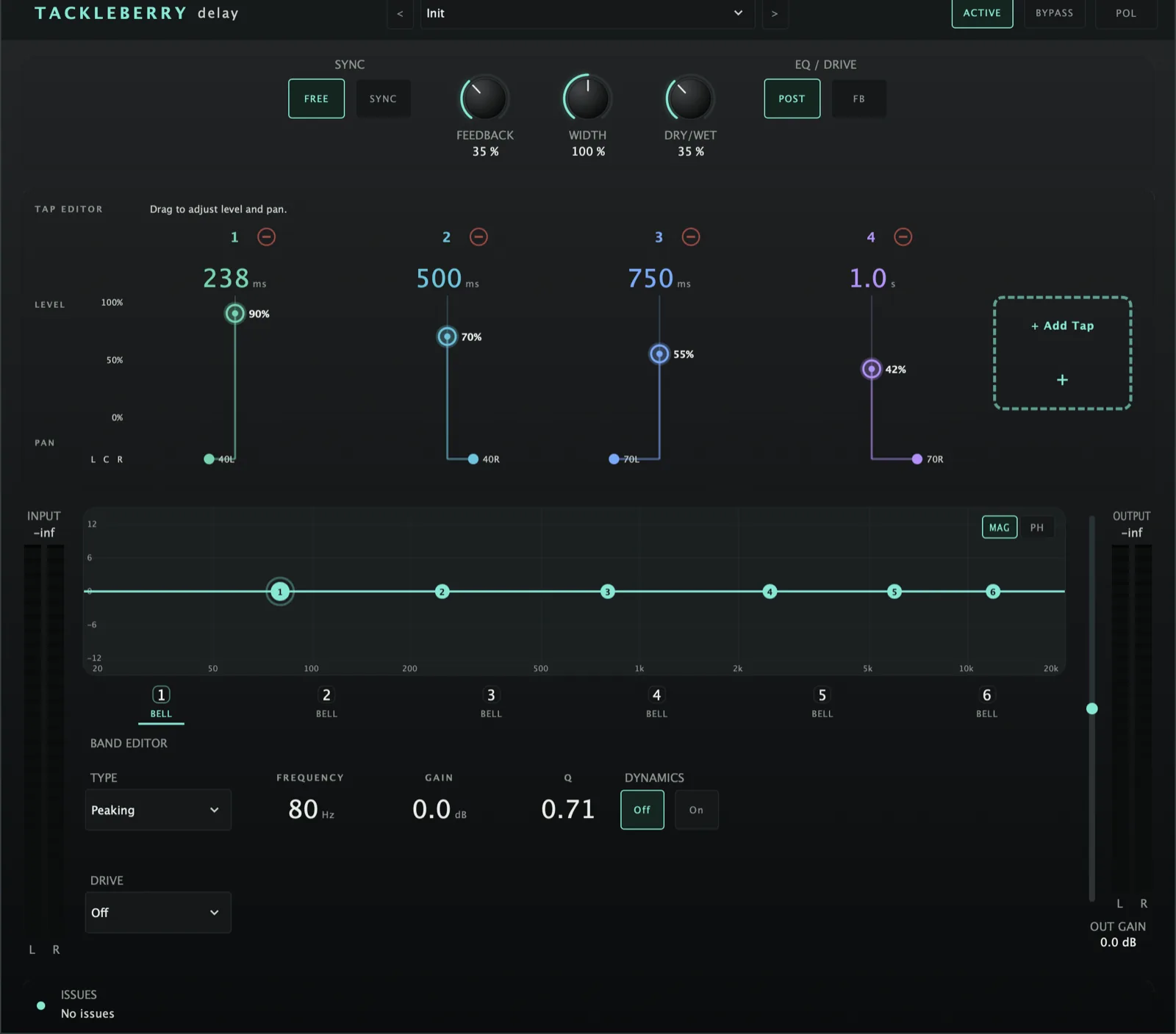 1234567891011121314
Quick start
- Insert on a send/aux or an insert with Dry/Wet pulled back.
- Add taps with + Add Tap; set each tap’s time / level / pan in the stem editor.
- Turn SYNC on to lock tap times to note divisions, or off for free ms.
- Set Feedback and Width, then colour the wet with the dynamic EQ / drive — choose Post or Feedback placement.
Multi-tap delay core
Up to 8 taps read ONE shared stereo buffer at their own fractional offsets — not N separate delay lines.
The + chip adds a tap; REMOVE takes out the selected one (the taps after it move down one). Per tap: time, level, pan, mute.
A coloured stem per tap: drag its height for LEVEL, its dot on the row beneath for PAN; its TIME is written under it. Clicking a stem selects that tap.
The chosen tap’s TIME (note division on SYNC, milliseconds on FREE), LEVEL, PAN and MUTE — the first control the mute setting has had.
4-point Catmull-Rom cubic interpolation on every fractional read — no saturation, wow/flutter or drift in the delay path. A tap-time move crossfades (~20 ms) between old and new read positions instead of jumping.
Global SYNC toggle. On: each tap picks a note division (1/1…1/32, dotted & triplet) locked to host BPM. Off: free-time ms (1 ms–4 s).
A single feedback gain on the summed tap output, recirculated into the buffer. It is scaled by how loud the taps are between them, so the repeats never grow: with several loud taps the top of the knob means “ring for a very long time” rather than a runaway. A soft limit on what recirculates is the safety net. Low and medium settings sound as they always did.
Stereo width (mid/side) on the wet.
The final mix (last delay knob).
Wet processing & placement
Six bands, identical to Denzel’s engine (static + up/down dynamics) plus per-band drive shapers — on the wet only.
MAG is the familiar magnitude response; PHASE swaps in a −180°..+180° grid on the same log-frequency axis and draws the wet EQ’s own summed phase response, low cut included — from the exact audio coefficients, so it cannot drift from what you hear.
Each dynamic band can key off an external sidechain — standard use: duck the delay repeats from the dry source.
A high-pass on the wet signal only, 0–500 Hz (fully down = Off), in the delay strip. The setting always existed; the rack face is the first to give it a control.
Post (default): buffer stays clean, EQ/drive shape the summed wet after the taps — every repeat coloured identically (mirrors Wallace). Feedback: the EQ’d wet recirculates, so each repeat is progressively re-coloured (classic dub “grimy tail”), and every repeat still lands exactly on time.