

Two Knobs
TK De-Esser
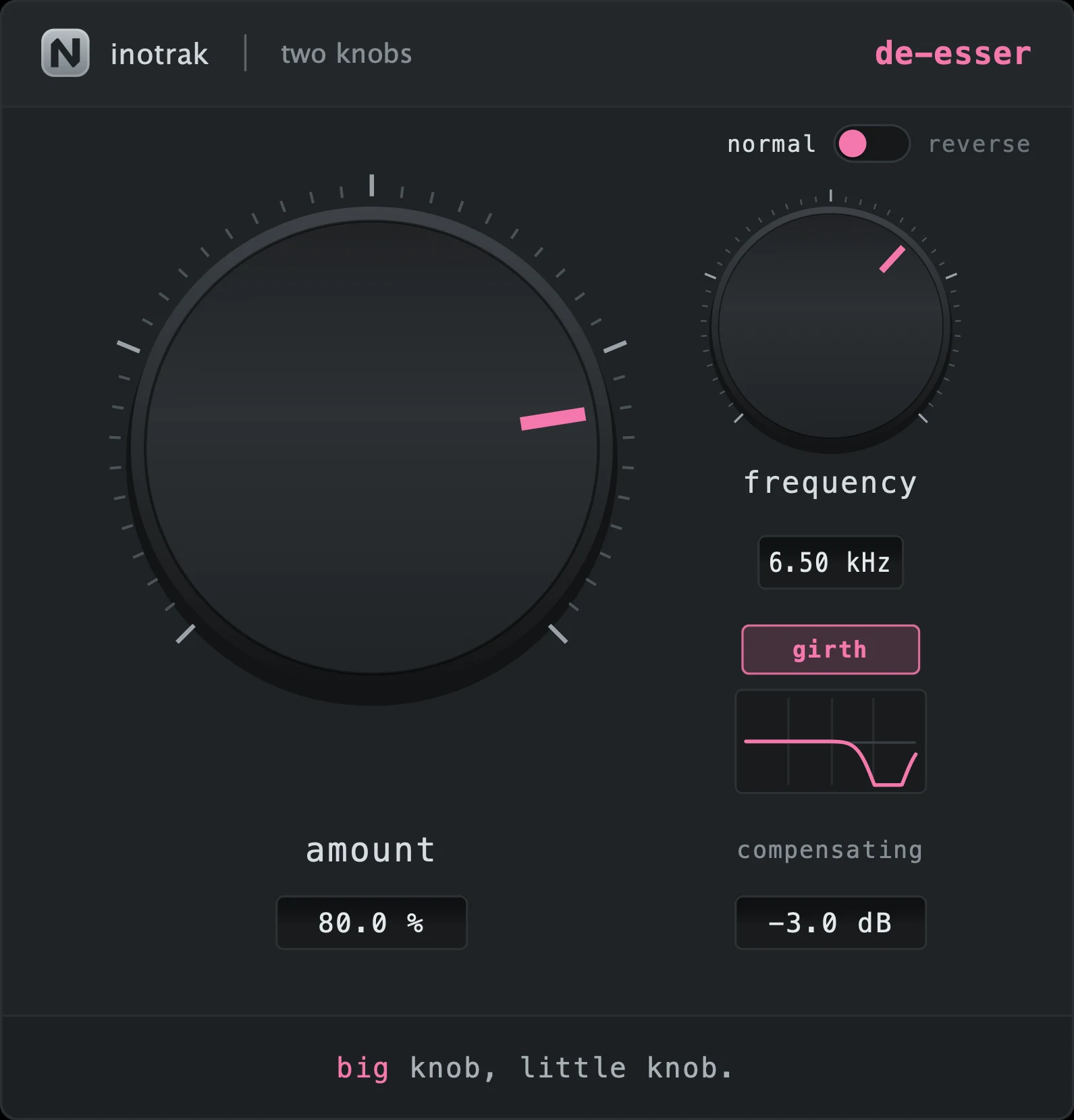
A relative detector that fires on an ess, not on a loud vowel, over a band that is replaced rather than notched. Reverse mode puts sibilance back into a whispered or over-de-essed take.
AU · VST3 · Standalone - not Pro Tools (no AAX). Formats and requirements.
Price includes VAT. Nothing is added at checkout.
Every update included
One price, and it is yours for good: every future update to what you buy is included at no extra cost. There is no subscription and no upgrade fee.
A de-esser with a relative detector - it compares the sibilance band against the broadband level, so it fires on an "sss" rather than on a loud vowel, which is what keeps it from dulling everything the singer does loudly. The band is replaced rather than notched out, so the untouched part of the spectrum is literally the input and there is no phase-smeared crossover to hear. A reverse mode puts sibilance back into a take that has lost its articulation.
demo
See it work.
what's in it
Every control, and what it's for.
Nothing here talks to the Analyser, or to any other plugin. Two Knobs holds no shared state and needs nothing else installed - what you see is the whole plugin.
The two knobs
Depth of reduction. The detector is relative - it compares the sibilance band against the broadband level, so it triggers on an "sss" rather than on a loud vowel. That is what stops it dulling everything the singer does loudly.
Where the band works, 2 kHz to 12 kHz, continuous.
The toggle and the button
reverse is the one people do not expect: it puts sibilance back when a vocal has gone soft - a whispered or heavily-compressed take that has lost its articulation. Because the detector is relative, it fires on a weak ess just as readily as a loud one, so there is something to lift. A little saturation is folded into the restored band, because an ess that is only louder still sounds dull - it needs its harmonics back too.
Opens the band from a narrow spot (Q 3.5) to about an octave (Q 1). The narrow setting is right when one singer has one specific ess; turn girth on when the sibilance is smeared across a region, or on a bus where several voices sibilate at different frequencies and no single spot catches them all.
TK De-Esser
£19 - every future update included, no subscription.
How the band is treated
The band is replaced rather than notched out - the untouched part of the spectrum is literally the input signal, so there is no phase-smeared crossover to hear.
What to reach for it on
Normal for any bright vocal; reverse for a close-mic’d whisper, a soft rap take, or a vocal that got over-de-essed somewhere upstream; girth on a backing-vocal bus.
Shared across the series
The same on all six, so learning one teaches you the set.
Input is level-matched to output continuously, so turning the big knob up never simply makes things louder - you hear the effect, not the volume. The compensating readout under the little knob shows what it is doing right now: negative means the plugin made things louder and the compensation is pulling back. It takes about a second to settle after a big move, deliberately - a compensator that reacts instantly is a compressor. TK Compressor is the one exception: its level rises with squeeze (see its own section).
Drag up and down to adjust. Hold shift while dragging for fine adjustment. Double-click a knob to return it to its default. You can also double-click a value readout and type a number.
A small live curve under the little knob showing what the plugin is currently doing to the signal - the transfer curve, the filter shape or the gate contour, depending on the plugin. It follows both knobs and the toggle.
Drag any edge. The aspect ratio is locked, the range is 60 %-200 %, and the size is remembered with the session. Everything stays readable at the bottom of that range.
No preset browser, no meter, no gain-reduction display, no A/B, no settings gear. Nothing to configure and nothing shared with any other plugin - these hold no cross-plugin state and behave identically with none of the rest of the suite installed.
quick start
Four steps to a sound.
- Sweep frequency onto the ess - 2 kHz to 12 kHz, continuous.
- Turn amount up until the sibilance sits down without the vocal going dull.
- On a bus, or where the sibilance is smeared across a region rather than one spot, turn girth on.
- For a soft or over-de-essed take, flip to reverse and put the articulation back instead.
Not currently suitable for Pro Tools
These are AU and VST3 plugins. Pro Tools only loads AAX, which these aren't built as - so none of the suite will appear in it. Please check your DAW before you buy - once you download, the sale is final.
Get TK De-Esser
AU · VST3 · Standalone - macOS 10.15 Catalina or later, Windows (VST3). Installers are not yet notarised, so there's one extra click on first install; the install guide walks through it.
Try the free demo of TK De-Esser first. Every control works; the demo just drops to silence for 2 seconds in every 30. Buy it and paste in the code you're sent, and the dropouts stop - no reinstall.
Where it's confirmed to work
Honest version: this is a one-person operation, so it has been properly tested in the DAWs below and not yet in the others. Not tested yet means exactly that - not that it fails.
| DAW | System | Plugins load |
|---|---|---|
| Logic Pro | macOS | Yes |
| GarageBand Confirmed with the six Two Knobs plugins on macOS. The rest of the range has not been tested there yet, and brain sharing has not been checked in it at all. | macOS | Yes |
| Ableton Live Confirmed loading on both macOS and Windows. The sharing side is still to be checked. | Mac/Win | Yes |
| Cubase / Nuendo Confirmed loading on both macOS and Windows. The sharing side is still to be checked. | Mac/Win | Yes |
| Studio One Confirmed on Windows (VST3). The sharing side is still to be checked. | Mac/Win | Yes |
| Reaper Confirmed on Intel Mac - both AU and VST3, and the plugins share with each other. Not yet tested on Windows. | Mac/Win | Yes |
| FL Studio | Mac/Win | Not tested yet |
| Bitwig Studio Confirmed loading on both macOS and Windows. Bitwig keeps plugins apart from each other by default, so the sharing side needs checking separately. | Mac/Win | Yes |
| Digital Performer | Mac/Win | Not tested yet |
| Pro Tools Pro Tools only loads AAX plugins. These are AU and VST3. | Mac/Win | No |
| System | Confirmed | |
|---|---|---|
| macOS on Intel | Yes | Confirmed working from 10.15 Catalina upwards. |
| macOS on Apple Silicon | Yes | Confirmed on an M4 Mac in Logic Pro. The installers are universal binaries, so they run natively - no Rosetta needed. |
| Windows 10 / 11 | Yes | VST3 only - there is no AU on Windows. Confirmed in Studio One, Ableton Live, Cubase and Bitwig. |
There is no second column here on purpose. This plugin passes nothing to any other plugin and holds no shared state, so a host that keeps plugins in separate processes costs it nothing - if it loads, it works. Tell me what you find in a DAW that isn't listed and this gets updated.
Part of Two Knobs - see also: