

On their own
Banshee Sustainer
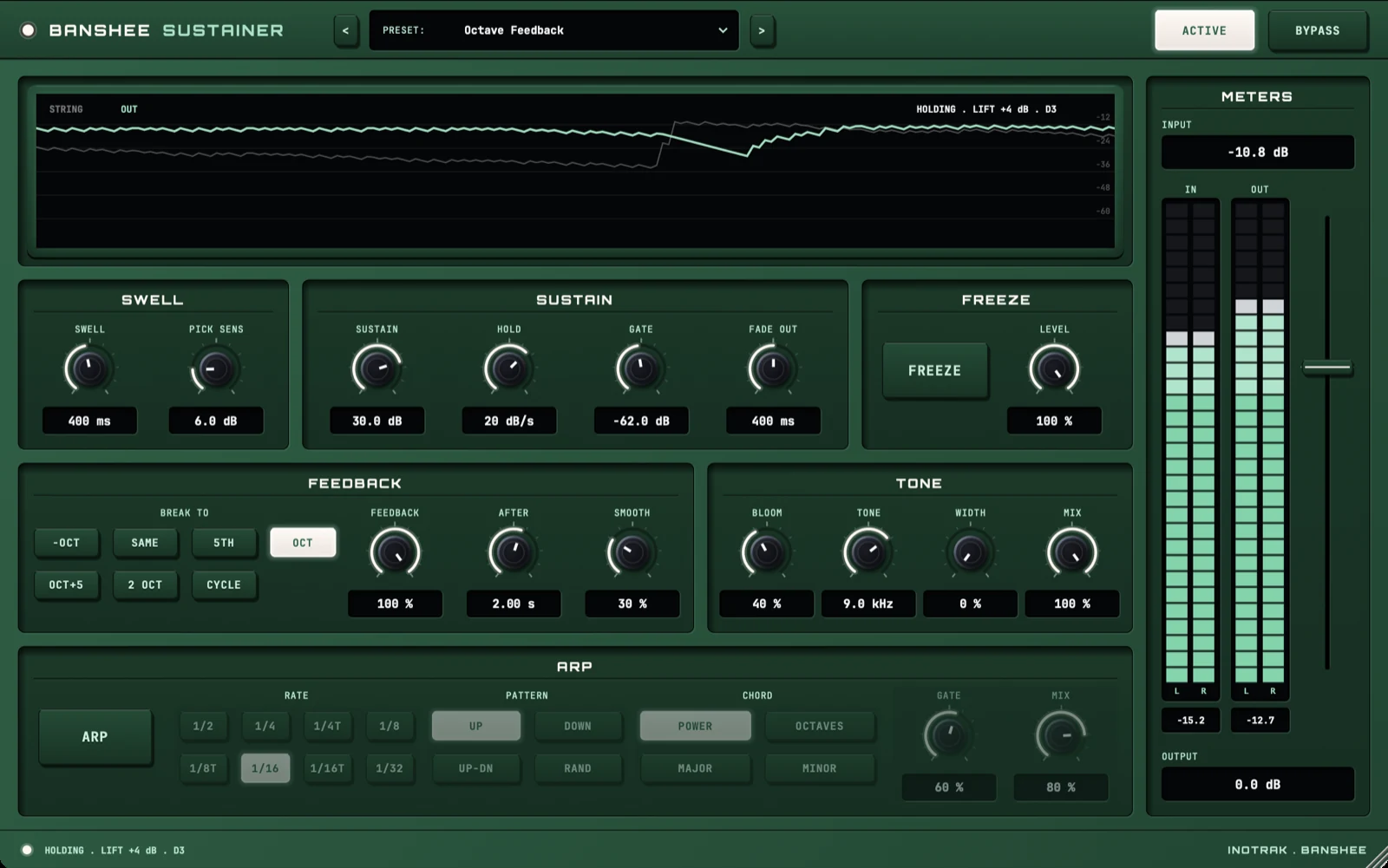
Bowed sustain for guitar. Every note swells in with no pick attack and holds instead of dying away - then breaks into feedback, up an octave, a fifth or two octaves, or down an octave. Freeze a note and play over it, or hold one note and let the arpeggiator play a chord from it in time with your song.
AU · VST3 · Standalone - not Pro Tools (no AAX). Formats and requirements.
Price includes VAT. Nothing is added at checkout.
Every update included
One price, and it is yours for good: every future update to what you buy is included at no extra cost. There is no subscription and no upgrade fee.
Bowed sustain for guitar. Each note fades in with no pick attack, then holds instead of dying away. Hold it longer and it breaks into feedback: up an octave, a fifth, two octaves, or down an octave, as a snap or a slow morph. Freeze a note and play over it, or hold one note and the arpeggiator plays a chord from it in time with your song. It goes on the clean DI, before your amp or amp sim.
demo
See it work.
On piano, into a big reverb
what's in it
Every control, and what it's for.
Swell
How each note starts.
Fade-in time for each note, 0-3000 ms (default 600 ms). Off keeps the pick. Banshee looks 5 ms ahead, so the pick is gone before it reaches the output.
How much harder than the note before a pick has to be to start a new swell, 2-24 dB (default 6). Higher lets hammer-ons and slides carry on without a new swell.
Sustain
How each note holds and how it ends.
The most a dying note may be lifted, 0-40 dB (default 24). The lift never takes the note above its own pick.
How fast that lift may climb, 0.5-60 dB a second (default 12). Low values let the note fade gently; high values hold it level.
The level below which the note is over, -90 to -30 dB (default -60). Below it, string noise is never lifted.
How long the note takes to fade once the gate closes, 10-3000 ms (default 300 ms).
Feedback
What a held note does in front of a loud amp. Single notes only.
What the held note breaks to: -OCT (an octave down), SAME (the note itself, as a pure tone), 5TH (a fifth up), OCT (default), OCT+5 or 2 OCT. CYCLE walks up and down the harmonics, one step each time AFTER passes. The new note is built from the note you played, so it is at full strength even where the string's own harmonic is weak.
How far it breaks, 0-100 % (default 0). 50 % is a blend of the note and the new one; 100 % goes all the way. At 0 the other feedback controls dim.
How long the note holds before it breaks, 100-8000 ms (default 2 s).
How it breaks. 0 % snaps straight to the new note; 100 % melts into it over about 4 seconds.
Banshee Sustainer
£29 - every future update included, no subscription.
Freeze
A note that carries on by itself.
Press it and the note you hear carries on as a seamless loop while you play over it. Press again to let it fade out. It is not saved in presets: it is something you play, like a footswitch.
Level of the frozen note, 0-100 % (default 100 %). The frozen note adds to what you play, so leave headroom with INPUT.
Arpeggiator
Hold one note and Banshee plays a chord from it, in time with your song.
Switches the arpeggiator on. It follows the song's tempo while it plays and counts from your pick when it is stopped. While it is on, it takes the place of the feedback break.
1/2, 1/4, 1/4T, 1/8, 1/8T, 1/16 (default), 1/16T or 1/32 of a beat at the song's tempo. T is a triplet.
Up, Down, Up-Down, or Random (never the same note twice in a row).
Power (root, fifth, octave, octave and fifth), Octaves (octave down, root, octave, two octaves), Major or Minor (root, third, fifth, octave).
How much of each step sounds, 10-100 % (default 60 %). Short is staccato, 100 % is legato.
The arpeggio against the held note under it, 0-100 % (default 80 %).
Tone
Colour, width and blend.
Grit that grows the longer the note is held, 0-100 % (default 0). At 0 it is off.
A low-pass filter, 800 Hz to Open (default Open). Softens the top.
Stereo: the broken note spreads wide while the string stays in the centre, 0-100 % (default 0). It works on a stereo track; on a mono track it does nothing. It needs Feedback, so it dims when Feedback is at 0.
Banshee against the dry guitar, 0-100 % (default 100 %).
Input, output and presets
Trim at the very front, ±24 dB. It sets what PICK SENS, GATE and the IN meter see. Aim for the IN meter peaking around -12 to -6 dB. Presets leave it alone.
Output level, -24 to +12 dB.
44 presets in eight groups: Basic, Bowed, Ambient, Feedback, Deep & Wide, Freeze, Arpeggio and Half-Time. < and > step through them. A preset you have changed shows a star after its name. They are starting points.
Takes Banshee out of the path, with the same 5 ms delay so nothing shifts in time.
quick start
Five steps to a sound.
- Put it first on a DI guitar track, with your amp or amp sim after it. After distortion a pick can no longer be told apart from a held note.
- Play and set INPUT so the IN meter peaks around -12 to -6 dB.
- Pick a preset. Every preset leaves INPUT alone, so it stays matched to your guitar.
- Play single notes. The pitch tracking that drives Feedback and the arpeggiator follows one note at a time; chords still swell and sustain.
- Press FREEZE on a note you like and play over it.
Not currently suitable for Pro Tools
These are AU and VST3 plugins. Pro Tools only loads AAX, which these aren't built as - so none of the suite will appear in it. Please check your DAW before you buy - once you download, the sale is final.
Get Banshee Sustainer
AU · VST3 · Standalone - macOS 10.15 Catalina or later, Windows (VST3). Installers are not yet notarised, so there's one extra click on first install; the install guide walks through it.
Try the free demo of Banshee Sustainer first. Every control works; the demo just drops to silence for 2 seconds in every 30. Buy it and paste in the code you're sent, and the dropouts stop - no reinstall.
Where it's confirmed to work
Honest version: this is a one-person operation, so it has been properly tested in the DAWs below and not yet in the others. Not tested yet means exactly that - not that it fails.
| DAW | System | Plugins load | They share with each other |
|---|---|---|---|
| Logic Pro | macOS | Yes | Yes |
| GarageBand The Two Knobs plugins are confirmed in GarageBand. This one has not been tested there yet. | macOS | Not tested yet | Not tested yet |
| Ableton Live Confirmed loading on both macOS and Windows. The sharing side is still to be checked. | Mac/Win | Yes | Not tested yet |
| Cubase / Nuendo Confirmed loading on both macOS and Windows. The sharing side is still to be checked. | Mac/Win | Yes | Not tested yet |
| Studio One Confirmed on Windows (VST3). The sharing side is still to be checked. | Mac/Win | Yes | Not tested yet |
| Reaper Confirmed on Intel Mac - both AU and VST3, and the plugins share with each other. Not yet tested on Windows. | Mac/Win | Yes | Yes |
| FL Studio | Mac/Win | Not tested yet | Not tested yet |
| Bitwig Studio Confirmed loading on both macOS and Windows. Bitwig keeps plugins apart from each other by default, so the sharing side needs checking separately. | Mac/Win | Yes | Not tested yet |
| Digital Performer | Mac/Win | Not tested yet | Not tested yet |
| Pro Tools Pro Tools only loads AAX plugins. These are AU and VST3. | Mac/Win | No | No |
| System | Confirmed | |
|---|---|---|
| macOS on Intel | Yes | Confirmed working from 10.15 Catalina upwards. |
| macOS on Apple Silicon | Yes | Confirmed on an M4 Mac in Logic Pro. The installers are universal binaries, so they run natively - no Rosetta needed. |
| Windows 10 / 11 | Yes | VST3 only - there is no AU on Windows. Confirmed in Studio One, Ableton Live, Cubase and Bitwig. |
"They share with each other" is the ANALYSE pass, the clash matrix and the AUTO settings. Where a DAW keeps plugins apart, every plugin still works perfectly on its own - they just can't pass measurements between them, and nothing breaks. Ten-second check in any DAW: put Analyser on two tracks, turn one to master, and see whether the second track appears in its overview. Tell me what you find and this list gets updated.
Part of On their own - see also: