

On their own
Riggs Pedalboard
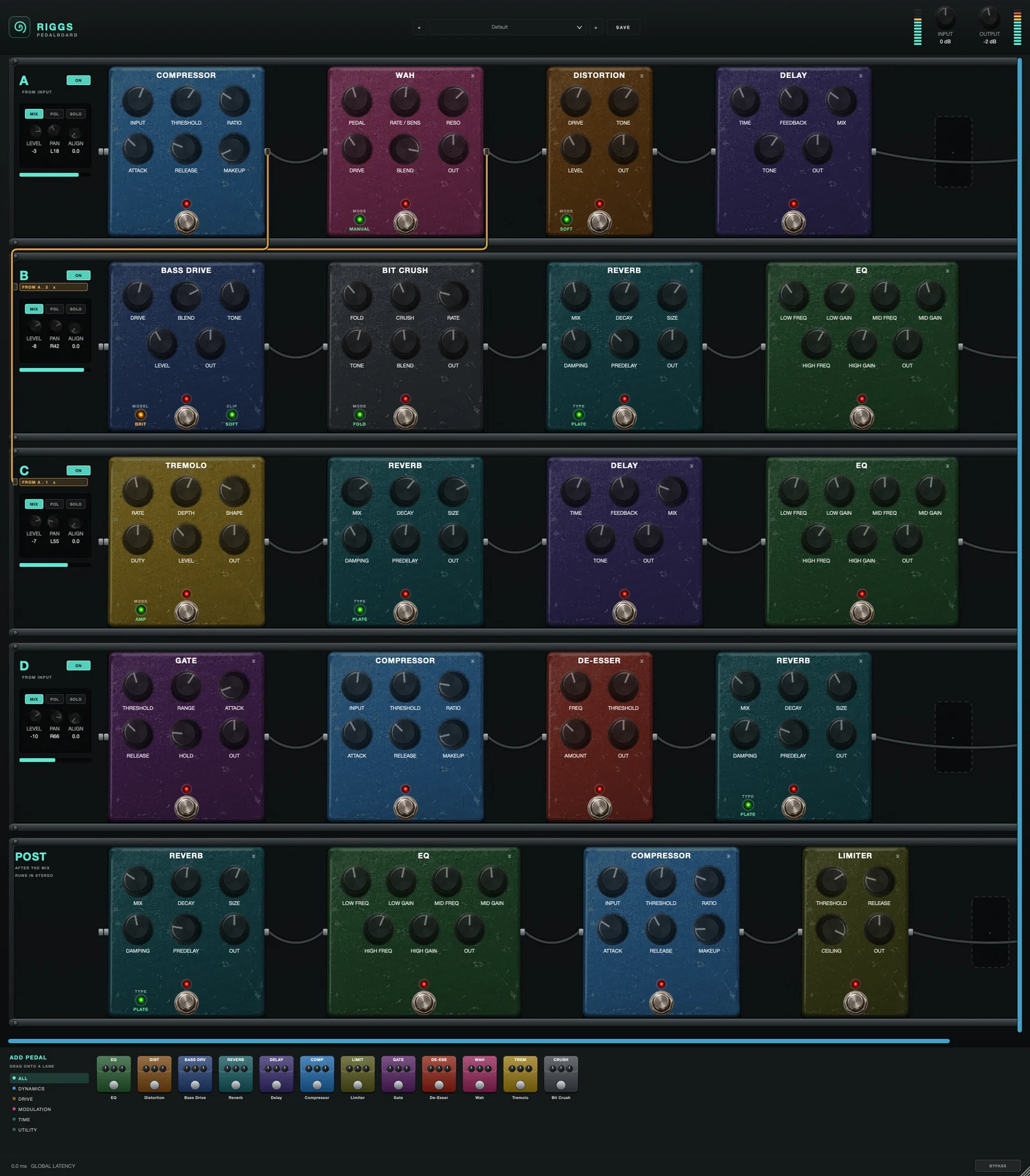
Twelve pedals on a board you can split. Four parallel lanes, and a lane can be fed from a point inside another one - so one lane is your front end and the rest branch off it, all still running.
AU · VST3 · Standalone - not Pro Tools (no AAX). Formats and requirements.
Price includes VAT. Nothing is added at checkout.
Every update included
One price, and it is yours for good: every future update to what you buy is included at no extra cost. There is no subscription and no upgrade fee.
Twelve pedals on a board you can split. Four parallel lanes of eight fixed spots, plus a post chain after the mix - and a lane can be fed either from the input or from a point inside another lane, which is what lets one lane be the shared front end while the others branch off it. Where G-Root and B-Root are an amp you insert pedals into, Riggs is the pedals and the routing between them: no amp, no cab, no voicing.
demo
See it work.
what's in it
Every control, and what it's for.
The board
Routing is by SOURCE, not destination - one lane can feed several.
Four parallel chains of eight fixed spots. A slot's lane and position are its index, not parameters, so moving a pedal copies its settings to the new slot rather than carrying a routing setting around with it.
What feeds this lane: the input, or a point inside another lane. Tapping a lane does not interrupt it - the tapped lane carries on to its own output, so the tap is genuinely parallel. Tapping after a lane's last pedal is just whole-lane chaining.
Whether this lane reaches the mix at all. Off turns a lane into a pure front end for the lanes tapping it.
Per-lane output trim, placement, and a delay to time-align a lane against the others. The pedals are mono; by the mix the lanes have panned, which is why only the eight POST slots carry a second pedal set for dual-mono.
Eight more spots after the lane mix, for anything that belongs on the summed signal rather than on one path.
Riggs Pedalboard
£19 - every future update included, no subscription.
The pedals
The twelve RootAmps pedals. Every one has a footswitch that bypasses it, and every one but the Compressor (which has its own MAKEUP) has an OUT knob.
Level after the pedal, -24 to +24 dB. Bypassing the pedal takes the OUT trim out with it, so a bypassed pedal is exactly transparent.
INPUT (-12 to +24 dB) is the level fed into it - more input means more compression at the same threshold. THRESHOLD (-40 to 0 dB) is where it starts turning down; RATIO (1:1 to 20:1) how hard; ATTACK (0.1-100 ms) how fast it clamps; RELEASE (10-500 ms) how fast it lets go; MAKEUP (0-24 dB) brings the level back up.
A hard ceiling. THRESHOLD (-24 to 0 dB) sets how hard it is pushed; RELEASE (10-500 ms) how quickly it recovers; CEILING (-12 to 0 dB) the level nothing can pass. It is instant with no lookahead: anything that still gets past is clipped at the ceiling.
Mutes the gaps between notes. THRESHOLD (-70 to 0 dB) is the level that opens it; RANGE (0-80 dB) how far it turns down when closed; ATTACK (0.1-50 ms) how fast it opens; HOLD (0-250 ms) how long it stays open after the note falls; RELEASE (5-500 ms) how fast it closes.
Tames harsh top end. FREQ (3-12 kHz) picks where; THRESHOLD (-40 to 0 dB) how loud that area has to be before it acts; AMOUNT (0-18 dB) the most it will cut.
Three bell bands, each with a frequency and a gain of ±12 dB: LOW (60-500 Hz), MID (300 Hz - 3 kHz) and HIGH (2-12 kHz).
DRIVE is how hard it clips. TONE darkens or brightens the result (a filter after the clipping, 800 Hz - 8 kHz). LEVEL is its output. MODE picks the clipping: Soft (smooth overdrive), Tube (warmer, uneven), Hard (tight and aggressive), Fuzz (square and buzzy).
A bass-style drive with a clean path kept alongside. DRIVE is how hard; BLEND mixes clean (0) to fully driven (100), so the low end can keep its body; TONE darkens or brightens the drive; LEVEL is its output. MODEL sets the voicing (CLEAN / CLS A / BRIT / MOD) and CLIP the clipping curve (Soft / Tube / Hard / Fuzz).
Digital destruction: Fold · Crush · Rate · Tone · Mode · Blend. Mode picks the shaper - Fold (the signal reflects at the rails, adding a new harmonic series per fold), Wrap (jumps hard to the opposite rail - the nastiest), Rectify (octave-up fizz) and Sine (rich but rounder); Fold sets how hard. Crush drops the bit depth from 16 to 1; Rate lowers the sample rate down to 500 Hz; Tone is a filter after it (300 Hz - 12 kHz); Blend mixes it with the clean signal. It is deliberately not anti-aliased - the inharmonic ring is the effect.
A resonant sweep into fuzz: Pedal · Rate/Sens · Reso · Drive · Mode · Blend. Because there is no treadle under your foot, Mode picks how the sweep moves - Manual parks it at Pedal (the cocked-wah sound), Auto opens it with your playing dynamics, LFO sweeps it continuously. Rate/Sens is the LFO speed in LFO and the sensitivity in Auto. Reso is how sharp and vocal the peak is. Drive at 0 is clean. Blend mixes it with the clean signal.
Rate (0.1-14 Hz) is the speed and Depth how deep. Shape morphs the wave from a smooth sine to a hard square; Duty skews it, so a short duty with a hard shape is a stutter and a long one a swell. Mode: Amp (classic level chop), Harmonic (the low and high halves move in opposite directions, so the tone rocks dark-to-bright rather than loud-to-quiet) and Bias (breathes and adds harmonics rather than chopping). Level (-6 to +18 dB) makes up the volume a deep tremolo loses. Free-running - there is no host tempo sync yet.
TIME (20-1000 ms) is the gap between repeats; FEEDBACK how many repeats (capped so it can never run away); MIX how loud the repeats are; TONE (800 Hz - 8 kHz) is a filter inside the repeats, so each one gets a little darker.
MIX is how much reverb; DECAY how long it rings; SIZE how big the space is; DAMPING how quickly the highs die away; TYPE picks Plate, Room or Hall; PREDELAY (0-120 ms) is a gap before the reverb starts, which keeps the dry note clear.
quick start
Four steps to a sound.
- Drag a pedal from the tray at the bottom onto a lane. Lanes fill left to right into fixed spots.
- To feed one lane from another, drag a lead from a pedal's output jack onto the other lane's panel. That tap is parallel, so the tapped lane carries straight on. Click the lane's FROM label to send it back to the input.
- Use lane A as your front end (comp, wah) and tap B, C and D off it. Turn A's MIX off if you only want it feeding the others.
- Set LEVEL / PAN / ALIGN per lane, then use the POST chain for anything that belongs after the mix.
Not currently suitable for Pro Tools
These are AU and VST3 plugins. Pro Tools only loads AAX, which these aren't built as - so none of the suite will appear in it. Please check your DAW before you buy - once you download, the sale is final.
Get Riggs Pedalboard
AU · VST3 · Standalone - macOS 10.15 Catalina or later, Windows (VST3). Installers are not yet notarised, so there's one extra click on first install; the install guide walks through it.
Try the free demo of Riggs Pedalboard first. Every control works; the demo just drops to silence for 2 seconds in every 30. Buy it and paste in the code you're sent, and the dropouts stop - no reinstall.
Where it's confirmed to work
Honest version: this is a one-person operation, so it has been properly tested in the DAWs below and not yet in the others. Not tested yet means exactly that - not that it fails.
| DAW | System | Plugins load | They share with each other |
|---|---|---|---|
| Logic Pro | macOS | Yes | Yes |
| GarageBand The Two Knobs plugins are confirmed in GarageBand. This one has not been tested there yet. | macOS | Not tested yet | Not tested yet |
| Ableton Live Confirmed loading on both macOS and Windows. The sharing side is still to be checked. | Mac/Win | Yes | Not tested yet |
| Cubase / Nuendo Confirmed loading on both macOS and Windows. The sharing side is still to be checked. | Mac/Win | Yes | Not tested yet |
| Studio One Confirmed on Windows (VST3). The sharing side is still to be checked. | Mac/Win | Yes | Not tested yet |
| Reaper Confirmed on Intel Mac - both AU and VST3, and the plugins share with each other. Not yet tested on Windows. | Mac/Win | Yes | Yes |
| FL Studio | Mac/Win | Not tested yet | Not tested yet |
| Bitwig Studio Confirmed loading on both macOS and Windows. Bitwig keeps plugins apart from each other by default, so the sharing side needs checking separately. | Mac/Win | Yes | Not tested yet |
| Digital Performer | Mac/Win | Not tested yet | Not tested yet |
| Pro Tools Pro Tools only loads AAX plugins. These are AU and VST3. | Mac/Win | No | No |
| System | Confirmed | |
|---|---|---|
| macOS on Intel | Yes | Confirmed working from 10.15 Catalina upwards. |
| macOS on Apple Silicon | Yes | Confirmed on an M4 Mac in Logic Pro. The installers are universal binaries, so they run natively - no Rosetta needed. |
| Windows 10 / 11 | Yes | VST3 only - there is no AU on Windows. Confirmed in Studio One, Ableton Live, Cubase and Bitwig. |
"They share with each other" is the ANALYSE pass, the clash matrix and the AUTO settings. Where a DAW keeps plugins apart, every plugin still works perfectly on its own - they just can't pass measurements between them, and nothing breaks. Ten-second check in any DAW: put Analyser on two tracks, turn one to master, and see whether the second track appears in its overview. Tell me what you find and this list gets updated.
Part of On their own - see also: