

On their own
Leone Widener
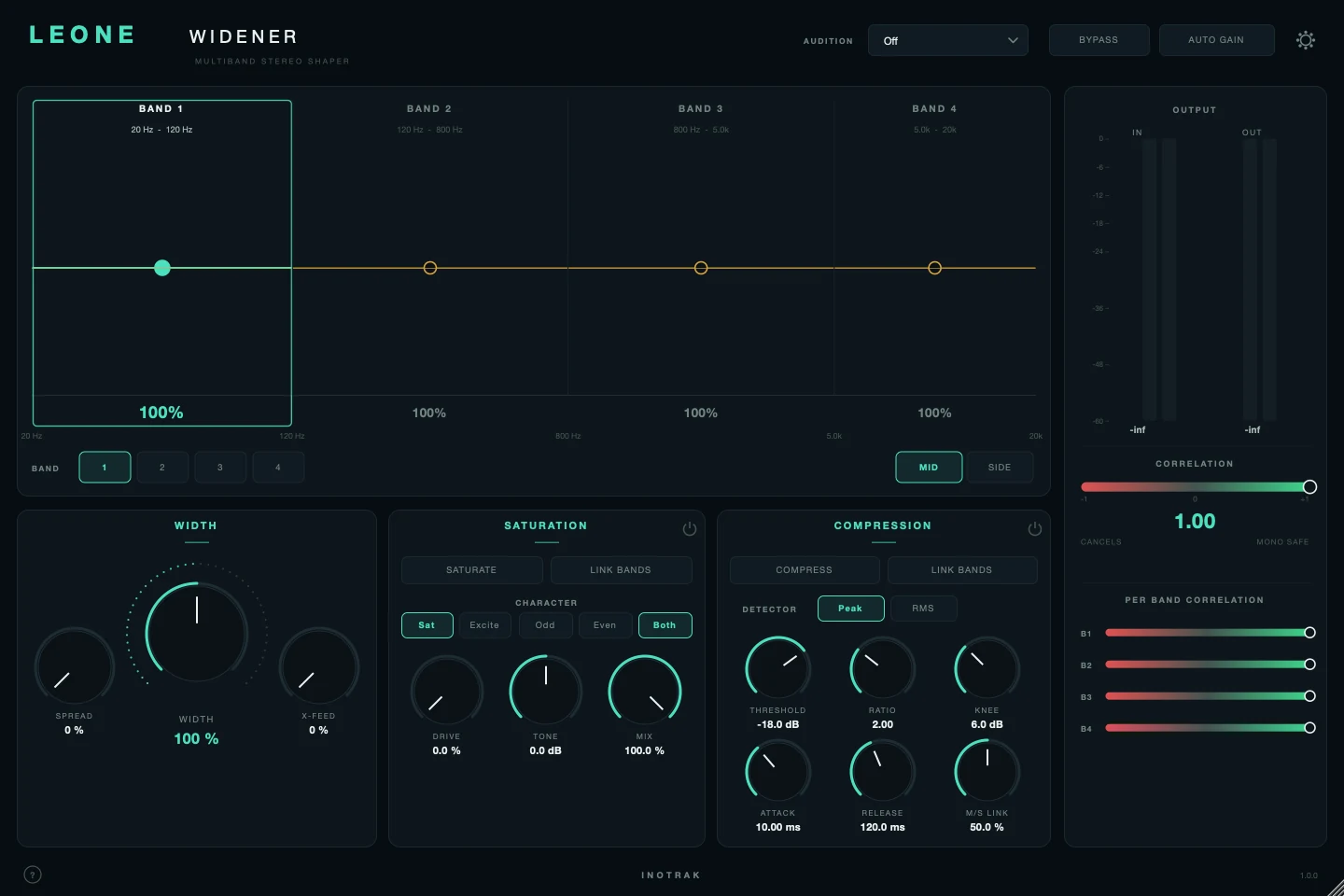
Most wideners are a width knob. Leone is four bands of width, spread and cross-feed, each with its own correlation and width readout - and a full saturation, compression and tape-wobble chain on the Mid and the Side independently, so the centre and the ambience can be treated as two different instruments.
AU · VST3 · Standalone - not Pro Tools (no AAX). Formats and requirements.
Price includes VAT. Nothing is added at checkout.
Every update included
One price, and it is yours for good: every future update to what you buy is included at no extra cost. There is no subscription and no upgrade fee.
A four-band stereo widener that also carries a full chain - saturation, compression and tape wobble - on the Mid and Side independently. Width, spread and cross-feed run per band on the Side, each band carrying its own correlation readout; the Mid chain is a separate signal path of its own, so the centre and the ambience can be treated as two different instruments. A bus and master tool, fully manual - no analysis pass, no brain.
demo
See it work.
what's in it
Every control, and what it's for.
The two structural rules
Everything else follows from these, and both are guaranteed by the topology rather than by care.
M = (L+R)/2 is exactly the mono sum, so the four-band split and every widening control - WIDTH, SPREAD and X-FEED - run on the Side alone. Crossover smear is confined to the ambience signal. The consequence in a mono fold is worth knowing and is true of any widener: the Side is not there, so the widening is not there either - it does not survive the fold badly, it is simply absent. The Mid chain is separate: saturation, compression and wobble on the Mid change the centre, and change the mono sum with it.
Every per-band stage is a parallel residual contribution (y = x + sum(P(band) - band)) - the same "add only the residue" model as Denzel's per-band drive. So a defaults instance is bit-identical to its input, not merely close.
The bands
Four bands across the spectrum. Everything in the panels below applies to the band you have selected.
Each band's height is its WIDTH. Drag a band up to widen it, down to narrow it. Alt-drag sets its SPREAD instead. Double-click puts WIDTH back to 100 % (Alt-double-click puts SPREAD back to 0). Clicking a band also selects it for the panels below.
The three split points between the bands. Drag a band edge sideways to move one. Ranges: 40-300 Hz (default 120 Hz), 300 Hz - 2 kHz (default 800 Hz), 2-12 kHz (default 5 kHz).
Which band the Width, Saturation and Compression panels are showing.
Which path the Saturation and Compression panels are editing - every band has a separate set for the Mid and for the Side. The Width panel does not change, because width only exists on the Side.
Width
Side only, per band. Three different ways of making a band wider.
Turns the band's existing stereo up or down. 0 % makes the band mono, 100 % (default) leaves it untouched, 200 % doubles its Side. It can only work with stereo that is already there - a band that is mono to start with has nothing for it to scale.
Creates new stereo from the band's centre, 0-100 % (default 0). It takes a copy of the band's Mid, turns its phase by a different amount at each frequency - all-pass filtering, so nothing is boosted or cut - and adds that into the Side. The result is width on a source that had none, such as a mono keyboard or a centred vocal. Because it lives in the Side, it vanishes completely in mono instead of combing the way a delay-based widener does. Each band uses a different phase pattern, so the four bands do not collapse back into one position.
Cross-feed, 0-100 % (default 0). Sends the harmonics the band's Mid saturator creates into the Side as well. The mono sum never hears the Side, so the colour appears in the stereo image and not the centre - saturation that widens rather than thickens. It only does anything when Mid saturation is switched on for that band with DRIVE above 0. Turn the Mid saturator's MIX to 0 and the centre stays clean while only the stereo picks up the harmonics.
Leone Widener
£29 - every future update included, no subscription.
Saturation
Per band, per path (MID or SIDE).
Switches saturation on for the selected band on the selected path. Off, or DRIVE at 0, passes the band through exactly.
While it is on, any change you make to this panel on one band is copied to the other three (on the same path). Turning it on does not copy anything by itself - the next change you make does.
Sat adds harmonics across the whole band - it thickens and softens transients. Excite keeps only the harmonics above about 3 kHz - it adds brightness and air without adding body.
Which harmonics are added. Odd is the harder, edgier kind. Even is the rounder, warmer kind. Both blends the two.
How hard the band is pushed into the saturator, 0-100 %.
Tilts the added harmonics darker or brighter, -6 to +6 dB around 1 kHz. It only changes the harmonics, not the band itself.
How much of the harmonics are added back, 0-100 % (default 100 %).
Compression
Per band, per path (MID or SIDE).
Switches the compressor on for the selected band and path. LINK BANDS works as it does for Saturation.
What the compressor listens to. Peak reacts to every transient; RMS follows the average level and is smoother.
Threshold (-60 to 0 dB, default -18) is the level above which it starts turning down. Ratio (1:1 to 20:1) is how hard. Knee (0-18 dB, default 6) is how gradually it starts - 0 is a hard corner, higher eases in.
Attack (0.1-200 ms) is how fast it clamps down; Release (10-1000 ms) is how fast it lets go.
0-100 %, default 50 %. How far the Side's gain reduction follows the Mid's. At 0 each path compresses on its own, so the stereo image breathes with the music. At 100 the Side gets the Mid's envelope and the image holds still. The two detectors always measure separately; only the gain reduction that is applied is blended.
Tape wobble
Behind the gear. One wobble per path, applied after the four bands are summed.
Switches wobble on for that path. Mid and Side have separate panels with the same controls.
Wow is the slow pitch drift of a tape machine. DEPTH sets how far it swings; RATE (0.1-2 Hz, default 0.6) how fast.
Flutter is the fast wobble you hear as a texture rather than as pitch. FLUTTER sets the amount; FLUT RATE (4-16 Hz, default 9) the speed.
A slow random wander on top of wow and flutter, so the movement does not repeat exactly.
0-180°, default 0. Offsets the Side's wobble cycle against the Mid's. At 0 both move together, like one tape machine. Towards 180 they move in opposite directions and the stereo image starts to swim.
Output and monitoring
Level of each path at the very end, ±12 dB. SIDE TRIM is a quick overall width for the whole mix; MID TRIM sets the centre level.
Final output level, ±24 dB.
A slow level match (over about 1.5 s) at the very end, so you judge a change at the same loudness rather than hearing louder as better.
Takes Leone out of the path.
Listen to one part on its own. Mono folds the output to mono so you can check it. Side plays only the Side. Band 1-4 solos one band (its Mid and its Side). Off is normal listening. It changes only what you hear, not any setting.
The OUTPUT meters show input and output level. CORRELATION shows how mono-safe the output is: +1 is mono, around 0 is wide, and towards -1 means parts will cancel when summed to mono. PER BAND CORRELATION gives the same reading for each band, so you can see which one is causing trouble.
quick start
Five steps to a sound.
- Put it on a bus or the master. Every band starts at 100 % width, which is bit-identical to the input.
- Raise WIDTH on the top bands first - widening the low band is usually what makes a mix fall apart in mono.
- If a band has little stereo in it to begin with (a mono synth, a centred vocal), WIDTH has nothing to scale - use SPREAD instead, which creates width from the centre.
- Set AUDITION to Mono to check the fold-down. The widening disappears there by design; only what you do on the Mid path changes the mono sound.
- Use the Mid and Side chains separately: saturation and compression on the Mid is centre glue, on the Side it is ambience.
Not currently suitable for Pro Tools
These are AU and VST3 plugins. Pro Tools only loads AAX, which these aren't built as - so none of the suite will appear in it. Please check your DAW before you buy - once you download, the sale is final.
Get Leone Widener
AU · VST3 · Standalone - macOS 10.15 Catalina or later, Windows (VST3). Installers are not yet notarised, so there's one extra click on first install; the install guide walks through it.
Try the free demo of Leone Widener first. Every control works; the demo just drops to silence for 2 seconds in every 30. Buy it and paste in the code you're sent, and the dropouts stop - no reinstall.
Where it's confirmed to work
Honest version: this is a one-person operation, so it has been properly tested in the DAWs below and not yet in the others. Not tested yet means exactly that - not that it fails.
| DAW | System | Plugins load | They share with each other |
|---|---|---|---|
| Logic Pro | macOS | Yes | Yes |
| GarageBand The Two Knobs plugins are confirmed in GarageBand. This one has not been tested there yet. | macOS | Not tested yet | Not tested yet |
| Ableton Live Confirmed loading on both macOS and Windows. The sharing side is still to be checked. | Mac/Win | Yes | Not tested yet |
| Cubase / Nuendo Confirmed loading on both macOS and Windows. The sharing side is still to be checked. | Mac/Win | Yes | Not tested yet |
| Studio One Confirmed on Windows (VST3). The sharing side is still to be checked. | Mac/Win | Yes | Not tested yet |
| Reaper Confirmed on Intel Mac - both AU and VST3, and the plugins share with each other. Not yet tested on Windows. | Mac/Win | Yes | Yes |
| FL Studio | Mac/Win | Not tested yet | Not tested yet |
| Bitwig Studio Confirmed loading on both macOS and Windows. Bitwig keeps plugins apart from each other by default, so the sharing side needs checking separately. | Mac/Win | Yes | Not tested yet |
| Digital Performer | Mac/Win | Not tested yet | Not tested yet |
| Pro Tools Pro Tools only loads AAX plugins. These are AU and VST3. | Mac/Win | No | No |
| System | Confirmed | |
|---|---|---|
| macOS on Intel | Yes | Confirmed working from 10.15 Catalina upwards. |
| macOS on Apple Silicon | Yes | Confirmed on an M4 Mac in Logic Pro. The installers are universal binaries, so they run natively - no Rosetta needed. |
| Windows 10 / 11 | Yes | VST3 only - there is no AU on Windows. Confirmed in Studio One, Ableton Live, Cubase and Bitwig. |
"They share with each other" is the ANALYSE pass, the clash matrix and the AUTO settings. Where a DAW keeps plugins apart, every plugin still works perfectly on its own - they just can't pass measurements between them, and nothing breaks. Ten-second check in any DAW: put Analyser on two tracks, turn one to master, and see whether the second track appears in its overview. Tell me what you find and this list gets updated.
Part of On their own - see also: