

Milton Consoles

Jessup Channel

FORMAT AU · VST3 · Standalone£29Updates included

The one that moves when you push it. A classic console channel strip reimagined in digital format: lean on it and the sound starts to bend, grabs with a hard knee and fills with thick harmonics. An EQ whose Q follows the gain, and THRUST to keep the bass big under compression - drums with attitude, bass that growls, vocals that jump forward.

Buy now - £29

AU · VST3 · Standalone - not Pro Tools (no AAX). Formats and requirements.

Price includes VAT. Nothing is added at checkout.

Every update included

One price, and it is yours for good: every future update to what you buy is included at no extra cost. There is no subscription and no upgrade fee.

Push it, and it moves

Lean on it and the sound bends early, grabs with a hard knee and fills with even and odd harmonics - fat, forward and full of attitude.

The Q follows the gain

No Q knob to chase: small boosts and cuts stay broad and gentle, big ones narrow in and get focused.

THRUST

Keeps the low end from pushing the compressor around, so the bass stays big while everything above it gets controlled. HARD switches to a hard knee.

A real attack

RATIO from 1.5:1 to 10:1, attack on its own knob, and a gate with an EXPAND mode.

Saturation on every band

No two analogue consoles ever behave quite the same, and the imperfection is half the charm. Saturation on every EQ band lets you add grit at every stage, exactly where you want it - and at zero it is not there at all.

WONKY

No console ever had two identical sides. WONKY makes left and right slightly different - one a shade fuller, the other a shade more forward - and lets them wander a little over time. Off, Wonky or Wonkier.

MIC or LINE

LINE is the input stage as it is. Switch to MIC and DRIVE pushes that stage much harder - from a little thickness to real grit - without the channel getting any louder.

Five shapes at the output

FLAT, SMILE, FROWN, MID and HIGH on one button: a gentle tilt at the end of the channel for when the track just needs to lean.

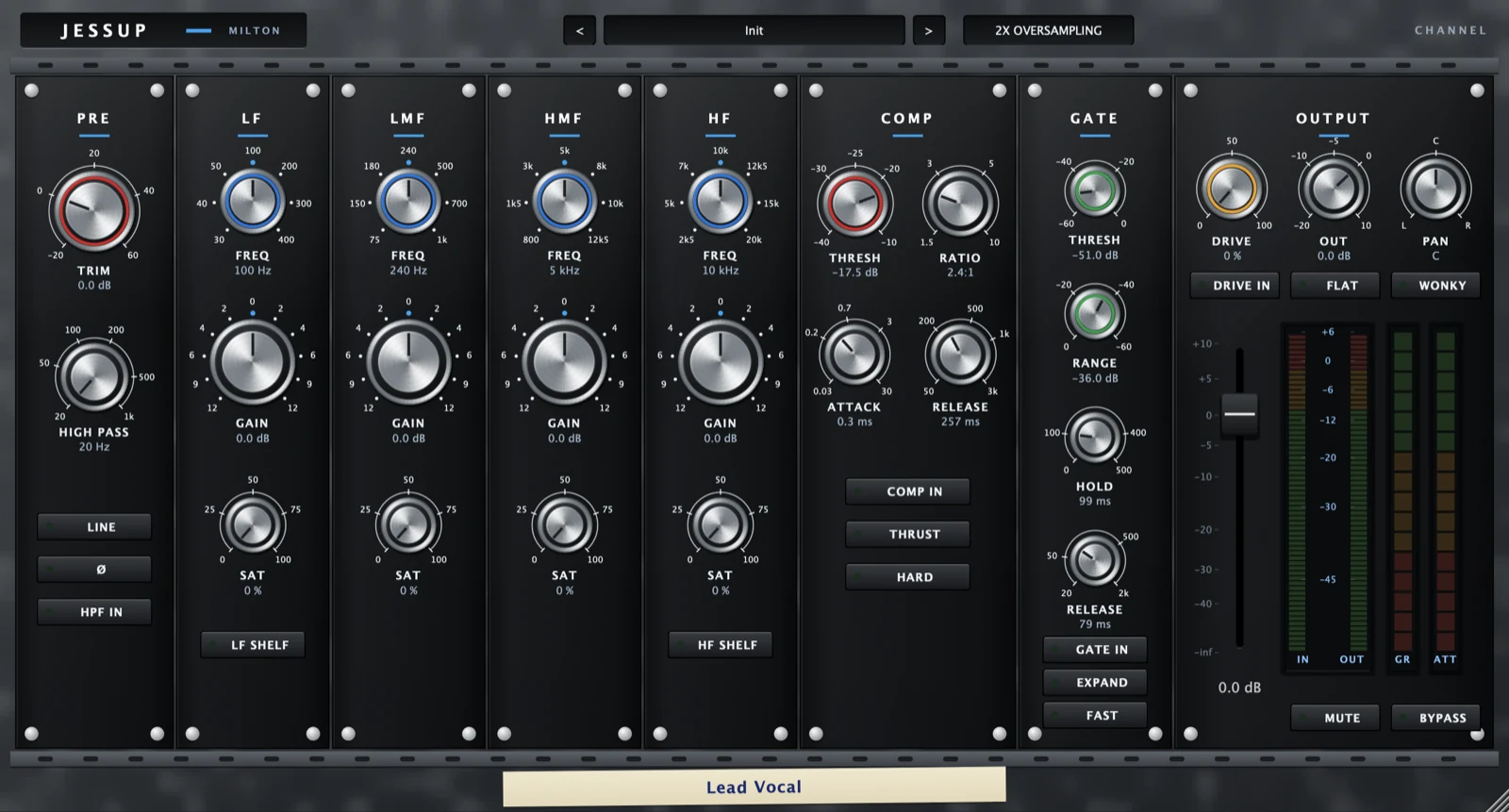
On the panel: a swept high pass, four EQ bands whose Q follows the gain and saturation on every band, a VCA compressor with an attack knob, THRUST and HARD, and a gate with hold, release and an expander mode.

why it's different

Push it, and the sound moves.

Push it, and it moves

Jessup is a console channel strip that answers the moment you lean on it. Push the level and the sound starts to move: it bends early, gives way with a hard knee, and fills with a dense mix of even and odd harmonics. It grabs - thick, forward and a little aggressive.

And the saturation on every band breathes with the performance instead of sitting at one flat setting: the loud hits bend further than the quiet ones, so the harder the player digs in, the more the sound comes alive.

The Q follows the gain

Jessup's bands have no Q control, because they don't need one: the Q follows the gain. Small boosts and cuts stay broad and gentle; big ones narrow in and get focused. So the EQ always does something musical with whatever amount you ask for.

THRUST

Bass is usually what makes a compressor misbehave: one big low note pulls the whole signal down and everything above it ducks. THRUST keeps the low end from pushing the compressor around, so the bass stays big and full while the mids and top get controlled.

Press it on a bass, a kick, a full drum bus or a mix and compress as hard as you like - the bottom end stops pumping and just sits there, huge. HARD switches to a hard knee for when you want the compression to bite rather than ease in.

A compressor with a real attack

The compressor listens to average level rather than peaks, which gives it a smooth, even hold. RATIO runs from 1.5:1 to 10:1, and the attack has its own knob - fast enough to catch a transient, slow enough to let one through. The gate has an EXPAND mode for turning spill down instead of cutting it.

A high pass that reaches

The high pass sweeps from 20 Hz all the way up to 1 kHz - enough to strip a vocal back to its body, or thin out a guitar that is fighting the bass.

Saturation on every band

No two analogue consoles ever behave quite the same, and part of their charm is the imperfection: a band that bends a little when you push it, a stage that roughens up before the rest. Saturation goes on every EQ band, and DRIVE does it for the amplifiers either side - so you can add grit at every stage of the channel, exactly where you want it and nowhere you don't.

Warm up the low mids of a bass without touching the top. Add grit to a snare's crack without roughing up its body. Give a vocal's presence some edge while everything else stays clean.

It behaves like a real gain stage, not a filter: a loud passage bends further than a quiet one, so the saturation breathes with the performance instead of sitting at one flat setting. On Jessup it is dense and gritty: a thick mix of even and odd harmonics. And at zero it is not there at all.

MIC or LINE, and DRIVE

DRIVE pushes the channel's amplifiers harder, and the output is level-matched - so turning it up changes the tone, not the volume. You hear exactly what the drive is doing, without being fooled by it simply getting louder.

The MIC / LINE switch decides how far it goes. LINE is the input stage as it is. Switch to MIC and DRIVE digs much deeper into the input, from gentle thickening near the bottom of its travel to real, obvious grit at the top. On Jessup it gets properly aggressive.

WONKY: two sides that don't quite match

No console ever had two perfectly identical sides. Parts vary, tolerances drift, and left and right end up just a little different. That difference is a big part of why a real desk feels alive and a plugin can feel flat. WONKY puts it back.

Switch it on and the two sides of the channel stop matching: one comes out a shade fuller through the body and the top, the other a shade more forward in the mids. Pan a source away from centre and the quieter side loses a little body and reads a touch brighter. With the compressor in, each side compresses slightly differently too.

It leaves your low end alone. Everything WONKY does happens above 700 Hz, so the bottom octave of the two sides stays matched and nothing here can push your bass out of mono - which is exactly what you do not want happening in front of a limiter.

Then it drifts. Each side wanders on its own, differently and unpredictably, so the difference never settles into something your ears learn to ignore. What you get is movement - a subtle sense of life between the speakers that you feel more than you hear. It shows most on centred sources: kick, snare, bass, lead vocal.

Choose Wonky or Wonkier, or switch it off and both sides are identical again. It isn't a warmth control and it isn't an effect. It is the imperfection, on a switch.

Five shapes at the output

Sometimes a track doesn't need an EQ move - it just needs to lean. One button at the output cycles five gentle shapes: SMILE lifts the lows and highs together, FROWN does the opposite and pulls the focus into the middle, MID adds body, and HIGH opens up the top. FLAT leaves the signal exactly as it was.

They are broad and subtle on purpose, so they work like the character of a channel rather than another EQ to think about. Across a whole mix they add up: a few smiles on the right tracks can change the whole picture.

Where it shines

Vocals and anything that wants to come forward. Drums that need attitude, bass that has to stay big under compression - that is what THRUST is for - and any track that should sound like it is being pushed hard and loving it.

Mixes that sound like nobody else

Milton gives you a console's character and then hands you the controls: grit on any band, two sides that drift apart, hidden character that responds as you push it, and a shape at the output for when a track needs to lean. Use as much or as little as the song wants.

It is the best of both worlds - the warmth, movement and happy accidents that make analogue feel alive, with the instant recall, precision and freedom of mixing in the box. The result is mixes that sound like nobody else's.

demo

See it work.

Wonky: two sides that don't quite match

what's in it

Every control, and what it's for.

01

Input

Where the signal meets the desk. How hard you hit this stage is part of the sound.

TRIM

Input level into the desk's input amplifier. Turning it up does not just make things louder - it drives that stage harder, and each desk gives way in its own way.

MIC / LINE

LINE (the default) is the input stage as it is. MIC changes nothing with DRIVE at zero; with DRIVE up it pushes the input stage much harder - about 15 % distortion at half DRIVE on a loud signal. The level stays matched, so it changes the grit and not the volume.

PHASE

Flips the polarity of the channel.

HIGH PASS / LOW PASS

The high pass sweeps 20 Hz - 1 kHz. There is no low pass on this desk. Each has its own IN switch.

02

Equaliser

Four bands, one module each from low to high, with no Q control: the Q follows the gain.

Gain

Every band boosts or cuts up to 12 dB.

LF

30 to 400 Hz. A bell until LF SHELF is lit, then a low shelf.

LMF

75 Hz to 1 kHz.

HMF

From 800 Hz upward.

HF

From 2.5 kHz upward. A bell until HF SHELF is lit, then a high shelf.

Jessup Channel

£29 - every future update included, no subscription.

Buy now - £29
03

Dynamics

A VCA compressor and a gate.

Compressor

THRESHOLD, RATIO (1.5:1 to 10:1), ATTACK and RELEASE, with a true RMS detector. THRUST keeps low frequencies from driving it; HARD gives a hard knee. COMP IN switches it.

Gate

THRESHOLD, RANGE (up to 60 dB), HOLD (up to 500 ms) and RELEASE. EXPAND makes it an expander; FAST speeds it up. GATE IN switches it.

04

Output and character

The output amplifier, the fader, and the imperfections that make a desk a desk.

DRIVE

Pushes both amplifiers past where they start to give way, with DRIVE IN to switch it. Level-matched, so it changes the distortion and not the volume.

Per-band saturation

Each EQ band has its own saturation. Off is bit-exact; turned up, it adds the desk's own harmonic flavour to that band.

WONKY

Cycles Off / Wonky / Wonkier; its lamp lights on Wonky and changes colour on Wonkier. The two sides of the channel stop being identical: the EQ is very slightly different on each side, and the compressor behaves slightly differently too. A small amount of movement between the speakers, the way two channels of real hardware never quite match.

OVERSAMPLING

The button beside the presets: 2x (the standard), 4x, 8x, 16x or 32x. Heavy DRIVE and band SAT can add a harsh, out-of-tune grit to bright, loud sounds; higher rates take it out. Each step roughly doubles the CPU, so 2x is the everyday setting. Up to about 70 % DRIVE, 4x already takes the grit out; full DRIVE or full SAT needs 16x or 32x, which are heavy enough to save for the final bounce. MIC with full DRIVE keeps some grit at any rate, most of all on Salford.

Output tilt

Cycles through FLAT, SMILE (a gentle low and high lift), FROWN (the reverse), MID and HIGH. FLAT is bit-exact. It sits on every channel, so a gentle setting across a whole session adds up.

OUT / PAN / FADER

Output trim, pan and channel fader. PAN is unity at centre and only attenuates. The fader has a console taper: 0 dB sits about three-quarters up, so the range you ride is spread out and the bottom is compressed.

Meters

Every meter sits in one bridge beside the fader: IN and OUT, gain reduction (GR) and gate attenuation (ATT).

MUTE / BYPASS

MUTE silences the channel. BYPASS takes the whole desk out of the path.

quick start

Four steps to a sound.

  1. Start at the defaults: EQ at 0 dB, dynamics out.
  2. Set the EQ bands by ear - there is no Q knob; small boosts are broad and big ones get narrower.
  3. Switch in the compressor and press THRUST on anything with a lot of low end, so the bass does not pump it.
  4. Push DRIVE for the most obvious harmonic character in the range.

Not currently suitable for Pro Tools

These are AU and VST3 plugins. Pro Tools only loads AAX, which these aren't built as - so none of the suite will appear in it. Please check your DAW before you buy - once you download, the sale is final.

Get Jessup Channel

AU · VST3 · Standalone - macOS 10.15 Catalina or later, Windows (VST3). Installers are not yet notarised, so there's one extra click on first install; the install guide walks through it.

Where it's confirmed to work

Honest version: this is a one-person operation, so it has been properly tested in the DAWs below and not yet in the others. Not tested yet means exactly that - not that it fails.

DAW compatibility
DAWSystem Plugins load They share with each other
Logic PromacOSYesYes
GarageBand
The Two Knobs plugins are confirmed in GarageBand. This one has not been tested there yet.
macOSNot tested yetNot tested yet
Ableton Live
Confirmed loading on both macOS and Windows. The sharing side is still to be checked.
Mac/WinYesNot tested yet
Cubase / Nuendo
Confirmed loading on both macOS and Windows. The sharing side is still to be checked.
Mac/WinYesNot tested yet
Studio One
Confirmed on Windows (VST3). The sharing side is still to be checked.
Mac/WinYesNot tested yet
Reaper
Confirmed on Intel Mac - both AU and VST3, and the plugins share with each other. Not yet tested on Windows.
Mac/WinYesYes
FL StudioMac/WinNot tested yetNot tested yet
Bitwig Studio
Confirmed loading on both macOS and Windows. Bitwig keeps plugins apart from each other by default, so the sharing side needs checking separately.
Mac/WinYesNot tested yet
Digital PerformerMac/WinNot tested yetNot tested yet
Pro Tools
Pro Tools only loads AAX plugins. These are AU and VST3.
Mac/WinNoNo
Operating system compatibility
SystemConfirmed
macOS on IntelYes
Confirmed working from 10.15 Catalina upwards.
macOS on Apple SiliconYes
Confirmed on an M4 Mac in Logic Pro. The installers are universal binaries, so they run natively - no Rosetta needed.
Windows 10 / 11Yes
VST3 only - there is no AU on Windows. Confirmed in Studio One, Ableton Live, Cubase and Bitwig.

"They share with each other" is the ANALYSE pass, the clash matrix and the AUTO settings. Where a DAW keeps plugins apart, every plugin still works perfectly on its own - they just can't pass measurements between them, and nothing breaks. Ten-second check in any DAW: put Analyser on two tracks, turn one to master, and see whether the second track appears in its overview. Tell me what you find and this list gets updated.

Part of Milton Consoles - see also: